
Arduino Animatronic Pirate Skull
Patrick Ryan was inspired to make a motion detecting, talking, and moving Pirate as fun project good for Halloween and International Talk Like a Pirate Day (September 19). It’ll be great for guarding the candy booty from hornswagglers, and oh yeah, learning about programming Arduino!
This project was submitted by one of our members. You can see more of our member's projects here.
Not a member yet? Sign up here.
I’m having a great time working on my project.
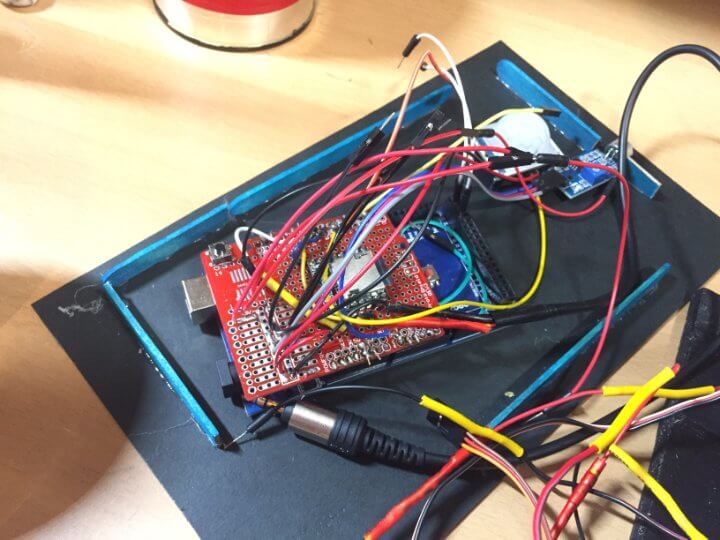
It is currently in a breadboard stage but he is working on getting the circuitry to fit on a single Arduino prototyping shield on top of the Arduino Mega to make the project more compact and robust. The differences between the pictures and the video show some of that development.

Blimey!
For the Pirate to surprise raiders or innocent passersby he has a PIR sensor that initiates all the action. The Pirate skull also has LED eyes that light up while speaking, and Patrick is working on making them flicker while the Pirate skull is speaking.
Ahoy, me Hearties!
The DFplayer Mini MP3 player sends a cool Pirate voice to an external speaker; and a microphone sensor picks up the sound level output from the speaker. The Arduino uses the microphone output level (HIGH or LOW) to set the jaw position for the jaw servo.

Shiver Me Timbers!
The skull is meant to be just a decoration piece so Patrick had to engineer the mount for the entire skull and the jaw connection to allow for movement. The jaw moves via a servo tucked inside and camouflaged with paint, and it is in sync with the audio output. The whole skull swivels back and forth for additional movement and effect.

I had so much fun making it and now I’m trying to strengthen it and make it more compact…it’s my first time and I am learning a lot.
He gave it a Heave Ho
Patrick had fun figuring out the mechanical, coding, and electronics assembly techniques. He has done very well for a landlubber and learned a lot going through his first project!
He is still working on it and looking forward to perfecting the code to get the Pirate shipshape. Soon he’ll be an old salt at this!
Arduino Code:
int time_period = 15; //  seconds

// set sensitive

int activateMin = 100; // min value

int activateMax = 800; // max value


#include <SoftwareSerial.h>

#include <DFMiniMp3.h>

#include <Servo.h>

Servo mouth;

Servo head;


#define pir     7   // pir motion sensor pin

#define besyPin 8   // DF player beasy pin.

#define led1    5   // led 1

#define led2    6   // led 2

#define soundIn A0


int calibrationTime = 10;

int pirState = 0;

int playState = 0;

int timeCount = 0;

int trackNum = 0;

byte flicker[] = {180, 20, 79, 23, 245, 200, 80, 150, 40, 230, 180, 45, 90}; // Led intensity

int headPos[] = { 20, 25, 50, 55, 90, 95, 130, 135, 160, 165, 120, 125, 70, 75, 90, 95, 100, 105, 110, 115, 90, 95, 150, 155 };

int x;

int y;

int z;

int tp = time_period * 20;


int mouth_state;

int mouthOpenMax = 133;

int mouthCloseMin = 39;

int sound_state;


class Mp3Notify

{

  public:

    static void OnError(uint16_t errorCode)

    {

      // see DfMp3_Error for code meaning

      Serial.println();

      Serial.print("Com Error ");

      Serial.println(errorCode);

    }


    static void OnPlayFinished(uint16_t globalTrack)

    {

      Serial.println();

      Serial.print("Play finished for #");

      Serial.println(globalTrack);

    }


    static void OnCardOnline(uint16_t code)

    {

      Serial.println();

      Serial.print("Card online ");

      Serial.println(code);

    }


    static void OnCardInserted(uint16_t code)

    {

      Serial.println();

      Serial.print("Card inserted ");

      Serial.println(code);

    }


    static void OnCardRemoved(uint16_t code)

    {

      Serial.println();

      Serial.print("Card removed ");

      Serial.println(code);

    }

};


SoftwareSerial secondarySerial(10, 11); // RX, TX

DFMiniMp3<SoftwareSerial, Mp3Notify> mp3(secondarySerial);


void setup() {

  Serial.begin(9600);


  Serial.println("initializing DF player......");


  mp3.begin();


  uint16_t volume = mp3.getVolume(); // get df player volume

  Serial.print("volume ");

  Serial.println(volume);

  mp3.setVolume(24);    // set df player volume


  uint16_t count = mp3.getTotalTrackCount(); // get total track

  Serial.print("files ");

  Serial.println(count);

  y = count;

  Serial.println("starting......"); Serial.println("");


  pinMode(pir, INPUT);

  pinMode (besyPin, INPUT);

  pinMode(led1, OUTPUT);

  pinMode(led2, OUTPUT);

  mouth.attach(22);

  head.attach(26);

  pinMode(soundIn, INPUT);

  mouth.write(mouthCloseMin);

  head.write(90);


  // calibrating sensor

  Serial.print("calibrating Motion sensor..... ");

  for (int i = 0; i < calibrationTime; i++) {

    Serial.print(".");

    delay(1000);

  }


  Serial.println("SENSOR ACTIVE");

  delay(500);

  Serial.println("DONE. ");

  delay(500);

}


void loop() {

  pirState = digitalRead(pir);    // read sensor states

  if (pirState == HIGH) {

    //Serial.println("sensor activeted.....");

    playState = 1;

    timeCount = 0;

  }


  else {

    //Serial.println("sensor deactiveted......");

    timeCount = timeCount + 1;

    if (timeCount > tp) playState = 0;

    // Serial.print("time count"); Serial.println(timeCount);

  }


  if ( playState == 1 ) {

    // ready to play mp3 track

    // beasy pin is HIGH  =  not playing mp3 ( now can play next mp3)

    // beasy pin is LOW   =  playing mp3 ( wait to stop mp3. after besy pin go HIGH)


    if (digitalRead(besyPin) == HIGH) {
        // if no playing mp3

      mp3.setVolume(24);

      trackNum = trackNum + 1;    //  set track number.   track number = 1 / 2 / 3.... etc..

      if ( trackNum > y ) trackNum = 1;

      mp3.playMp3FolderTrack(trackNum); // play selected track. ( track 1/2/3/4/5/6/7/...)

      Serial.print("play Track  "); Serial.println(trackNum);

      delay(1000);

    }


    else { //if mp3 is playing

      servoFunction(); // control mouth

      // lighting up

      analogWrite(led1, flicker[x]);

      analogWrite(led2, flicker[x]);

      x = x + 1;

      if (x > 12 ) x = 0;

      head.write(headPos[z]);

      if (x == 0); z = z + 1;

      if (z > 23) z = 0;

      Serial.println(" playing......");

    }

  }


  else {

    analogWrite(led1, 0);

    analogWrite(led2, 0);

    head.write(90);

    mouth.write(mouthCloseMin);

    trackNum = 0;


    //stop playing

    mp3.setVolume(0);

    mp3.stop();

  }


  delay(50);

}


void servoFunction () {

  sound_state = map(analogRead(soundIn), activateMin, activateMax, mouthCloseMin, mouthOpenMax);

  mouth_state = sound_state;

  if ( mouth_state < mouthCloseMin) mouth_state = mouthCloseMin;

  if ( mouth_state > mouthOpenMax) mouth_state = mouthOpenMax;

  mouth.write(mouth_state);

  Serial.println(mouth_state);

}









nice Job !!
What is the microphone sensor type ? KY-038 ?