
Smoker Controller | DIY Wireless BBQ
I wanted a full featured wireless smoker controller that would enable me to control my smoker automatically and provide status.
There is nothing off the shelf that does all of what I wanted.
This project was submitted by one of our members. You can see more of our member's projects here.
Not a member yet? Sign up here.
The smoker controller provides control of the firebox fan with two probes (tank and meat) that report temperatures. The code sends information to the Blynk app.
The app also enables the user to control the desired target temperature. Once this temperature is reached, a notification is sent informing the user that the meat is done. The app also monitors tank temperature and notifies the user to check the firebox.

The struggle
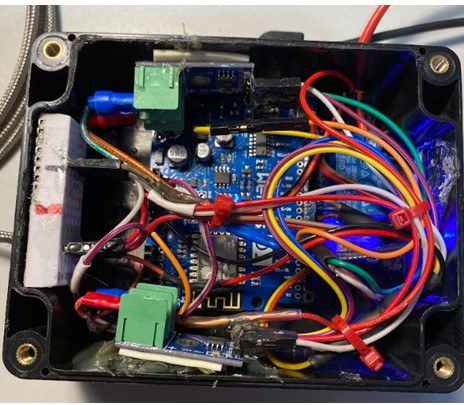
The main struggle was getting some of the code logic to work as desired, but the most frustrating part was packing all the components and wiring into the 2.5 x 4.5 enclosure.
I first made the mistake of using a glue gun to secure the components. The heat from the glue destroyed the WEMOS and sensors!
All systems go
Other than adding a few features along the way that I did not plan for, it is doing exactly as originally conceived.
Through iterative testing I determined that the notification to add fuel to the fire would be useful.
Smoker Controller Project Takeaways
The most useful thing I did was learning and implementing the interface with Blynk IOT.
I had originally started the project as a web server implementation. In addition to the better dashboard interface of Blynk, the ability to have an iPhone app made a ton of difference.
The Wireless Thermocouple course was very helpful. Primarily the Blynk portion was most instructive since I had no previous experience with it.
Programming Electronics Academy members, check out the Wireless Thermometer Project for practice building useful IoT devices.
Not a member yet? Sign up here.
BBQ Smoker Fan Controller Overview
The Smoker fan controller maintains a set smoker tank temperature that the user controls. This temperature may be adjusted but defaults to 200 degrees F.
Components consists of:
- two K-Type Thermocouples
- MAX 8875 temperature sensors
- single channel relay
- WEMOS D1 R3 processor
- 12V power adapter
- 12V fan that is attached to the smoker wood box
- Plastic box
Operation of the controller simply requires inserting the thermos probes in the smoker and meat, plugging the 12V DC power adapter into 110V power and the controller.
The Arduino IDE was used to write the code.
| Items | Specifications |
| Enclosure for components | 2.5” x 4.5” plastic box from Amazon |
| Arduino ESP8266 | WEMOS D1 R3 |
| Temperature Sensor | MAX 6675 temperature sensor |
| Fan | 12V DC |
| Fan Relay | Fan Relay 1 Channel Relay Shield Module, 3PCS DC 5V Indicator Light LED Module for Arduino |
| Power connector | 2 wire barrel |
| Phone App | Temperature probes |
| Power source | 110V AC |
Smoker Controller Capabilities
Here are the capabilities I set out to build in this smoker controller.
- Ability to dynamically adjust tank threshold temperature
- Ability to dynamically adjust meat threshold temperature
- Maintain a constant smoker tank temperature
- Interface to enable monitoring temperatures and make adjustments to tank temperature
- Ability to monitor smoker temperatures
- Send alert to mobile when:
- meat temperature getting close to target
- meat temperature is at target
- smokebox needs added
BBQ Smoker Controller Prototype
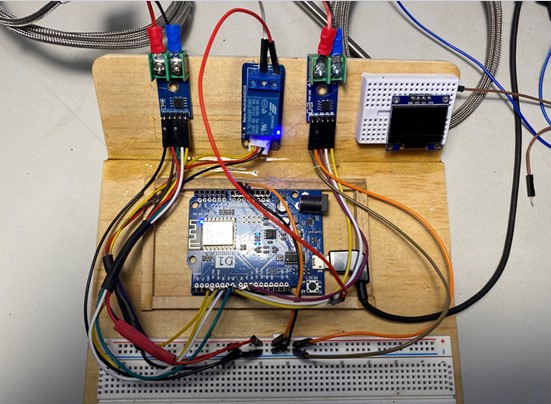
Finished Enclosure
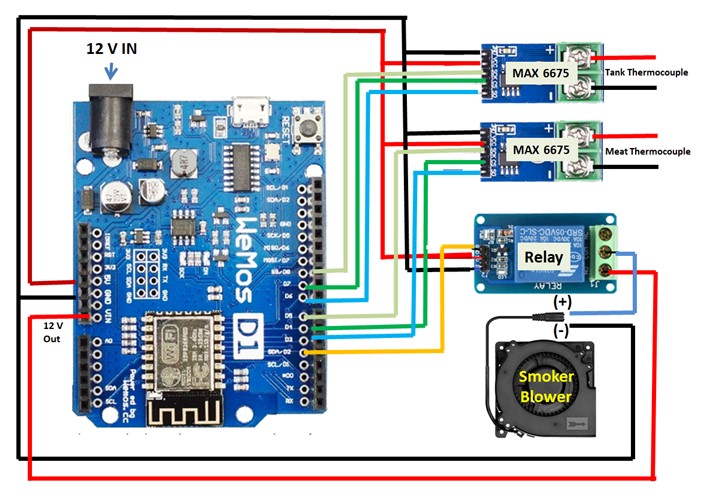
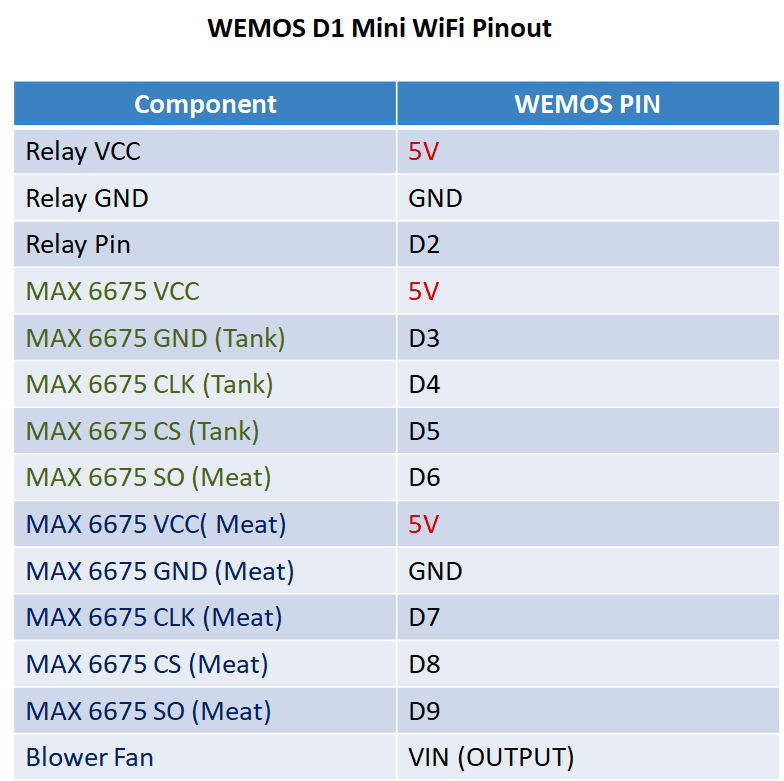
BBQ Smoker Controller Circuit Diagram and Pin Mapping
Smoker Controller Arduino Code
//Project: BBQ Smoker Controller
//Written by: Ron Penrose
//November 2023
//Controller Parts: WEMOS D1 R2, 1 Channel Relay, MAX6675 Temperature Sensor, 12V DC Fan, 12V DC power adapter,
//K-Type Thermocouples, Plastic Enclosure
//Features: Displays Tank and Meat temperaturs, User set Target Temperature, Fan control based on target
//          temperature setting by user, notifification when meat temperture reached, notification when
//          smoker firebox needs attention (tank temperature drops below 20 degreees, displays Fan Status on/off
//IOT Platform: Blynk
//References: Programming Electronics Blynk course, YouTube, Arduino website

//Blynk connection information
#define BLYNK_TEMPLATE_ID "YOUR_ID"
#define BLYNK_TEMPLATE_NAME "YOUR_NAME"
#define BLYNK_AUTH_TOKEN "YOUR_TOKEN"
#define BLYNK_PRINT Serial

//Libraries
#include "max6675.h"
#include <ESP8266WiFi.h>
#include <BlynkSimpleEsp8266.h>

//For sending data from device to Blynk cloud
BlynkTimer timer;

//Target temp; commented out because added Slider to Dashboard
//enabling adjustment. Slider default is 200 adjustable.
int targetTemp = 200;
float minutesSinceStart = 0;
float smokeTime = 0;
String message = "Waiting for status...";

//Max 6676 Pin Assignments
int thermoCLK = D3; //green
int thermoCS = D4;  //purple
int thermoDO = D5;  //white

int thermoMeatCLK = D6; //purple
int thermoMeatCS = D7;  //blue
int thermoMeatDO = D8;  //yellow

int relayPin = D2;

const int thermErrorFactor = 4; // determiend by testing thermocoupes in ice water and temperature probe
String fanStatus = ""; //is fan on or off

float maxTankTemp = 0;
float minTankTemp = 0;
bool get_data = false;

const char* ssid = "xxxx";
const char* pass = "xxxx";

//Thermocouple
MAX6675 thermocouple(thermoCLK, thermoCS, thermoDO);
MAX6675 thermocoupleMeat(thermoMeatCLK, thermoMeatCS, thermoMeatDO);

//Functions for Tand and Meat Temperatures
float tank_temp()
{
  return thermocouple.readFahrenheit() - thermErrorFactor;
}

float meat_temp()
{
  return thermocoupleMeat.readFahrenheit() - thermErrorFactor;
}

//Write target temp from device to Blynk cloud
BLYNK_WRITE(V4)
{
  targetTemp = param.asInt();
  //param.asString() for a String value
  //param.asDouble() for a Double value
//  Serial.print("Slider Value:");
//  Serial.println(targetTemp);
}

//Write low time from device to Blynk cloud
BLYNK_WRITE(V7)
{
  message = param.asString();
  //param.asString() for a String value
  //param.asDouble() for a Double value
}

//Push all values Pins with data
void timerEventUpdateTemp(){

  Blynk.virtualWrite(V0, tank_temp());
  Blynk.virtualWrite(V1, meat_temp());
  Blynk.virtualWrite(V2, smokeTime);
  Blynk.virtualWrite(V3, fanStatus);
  Blynk.virtualWrite(V4, targetTemp);
  Blynk.virtualWrite(V5, tank_temp());
  Blynk.virtualWrite(V6, meat_temp());
  Blynk.virtualWrite(V7, message);

//  Serial.print(", Minutes Since Start: ");
//  Serial.print(minutesSinceStart);
//  Serial.print(", Temp Threshold: ");
//  Serial.print(targetTemp);

  //Check if tank temp is less than target temp
  //If so let construct feedback message that is reported by Blynk functions
  if(tank_temp() < targetTemp -10)
  {
      message = "Check Firebox";
  }
  else
    {
      message = "Firebox Ok";
    }

  //Send notification if temp >= tempThreshold
  static boolean tempSentFlag = false;
  if (meat_temp() >= targetTemp && !tempSentFlag) {
    Blynk.logEvent("meat_target");
    tempSentFlag = true;
  }

  //If targetTemp changes, reset notification flag
  static int lastTargetTemp = targetTemp;
  if(lastTargetTemp != targetTemp) {
    tempSentFlag = false;
    lastTargetTemp = targetTemp;
  }
}

void setup() {

  //Set pins for OUTPUT
  pinMode(relayPin,OUTPUT);
  pinMode(LED_BUILTIN,OUTPUT);
  Serial.begin(115200);
  Serial.println();

  //Start Blynk communications
  Blynk.begin(BLYNK_AUTH_TOKEN, ssid, pass);
  //Update every 10 seconds
  timer.setInterval(1000*10L, timerEventUpdateTemp);

}

void loop() {
  Blynk.run();
  timer.run();

  //Monitor Tank and Meat temperatures
  //Regulate blower based on temp
  if (tank_temp() < targetTemp) {
    digitalWrite(relayPin, HIGH);
    fanStatus="ON";   // this is displayedd on Blynk app
  }
  else {
    digitalWrite(relayPin, LOW);
    fanStatus="OFF";  // this is displayedd on Blynk app
  }

  //Smoke Time (x.xx) hrs.
  minutesSinceStart = (millis()/1000)/60;
  smokeTime = (millis()/1000)/3600;
  smokeTime = millis() * 2.7777777777778E-7;

//  Serial.println(tempThreshold);
//  Serial.print("Tank: ");
//  Serial.print(tank_temp());
//  Serial.print(" Meat: ");)
//  Serial.print(meat_temp());
//  Serial.print(" Smoke Time: ");
//  Serial.print(smokeTime);
//  Serial.print(" Fan: ");
//  Serial.println(fanStatus);

}
About Ron

Ron got into Arduino programming about a year ago, but spent a career as a software engineer and military helicopter pilot.









