Arduino GIGA Display Shield Review
The Arduino GIGA Display Shield is here…but is it worth your time?
The world of microcontrollers and development boards has seen a continuous influx of innovative products that cater to the creative minds of makers and programmers.
One such exciting addition to the Arduino ecosystem is the Arduino GIGA Display Shield, designed to work seamlessly with the Arduino GIGA R1 WiFi board.
In this article, we’ll delve into the capabilities of this impressive shield and how it can elevate your project to a new level of multimedia interactivity.
GIGA Display Shield – A Visual Marvel
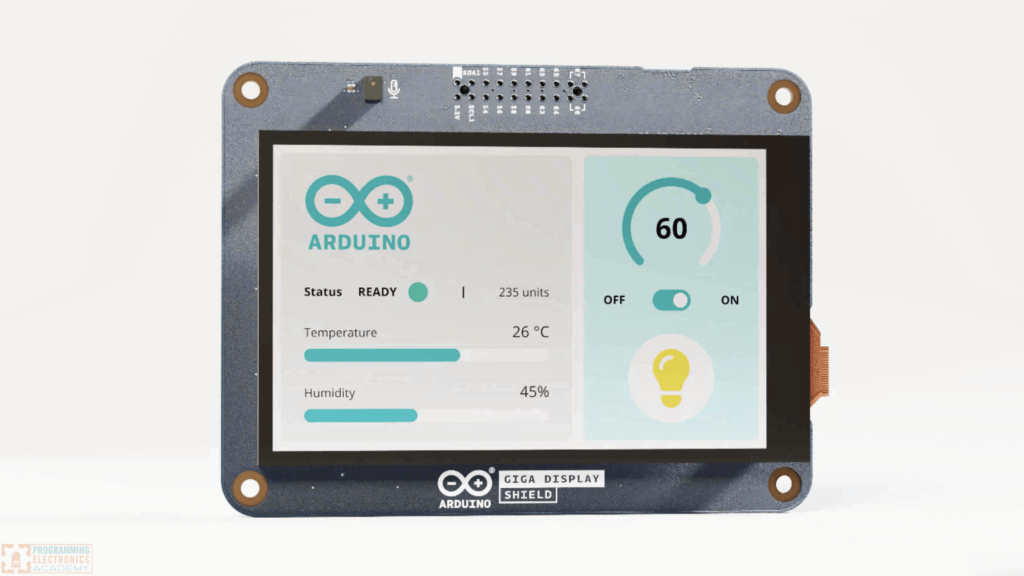
First things first, the Arduino GIGA Display Shield is all about its stunning 3.97-inch display. To put its size into perspective, it’s larger than the average hand, making it an excellent choice for projects that require substantial visual real estate.
This expansive screen opens up numerous possibilities for crafting engaging graphical user interfaces and multimedia experiences.
Multimedia Features Galore

The Arduino GIGA Display Shield boasts a multitude of integrated features. One standout feature is the built-in microphone, offering the potential to add audio input to your projects. Additionally, the shield is equipped with an ArduCAM camera attachment point, allowing you to capture images and display them directly on the screen. This feature alone provides endless opportunities for creative projects.
Furthermore, an RGB LED is incorporated into the display, enabling you to incorporate dynamic lighting effects into your projects.
On the back of the shield, you’ll find an Inertial Measurement Unit (IMU), acting as a gyroscope to detect and report the board’s orientation. This capability can be harnessed to create interactive applications that respond to movement and positioning.
Touchscreen Capabilities

The Arduino GIGA Display Shield also supports touchscreen functionality. With library support, you can easily detect up to five different contact points on the screen and determine their precise location. This capability is a game-changer for creating interactive interfaces and enhancing the user experience.
Seamless Integration

One standout feature of the Arduino GIGA Display Shield is its ease of integration. Designed specifically for the GIGA R1 WiFi board, it fits together seamlessly.
Unlike traditional shields that attach on top, this shield features pin headers on the inside, allowing it to be attached from the back. This unique design maintains access to all the pins while providing a secure and neat fit. It’s a thoughtful design choice that enhances the overall aesthetics of your project.
Getting Started with GIGA Display Shield Arduino Libraries

To unlock the full potential of the Arduino GIGA Display Shield, it’s recommended to start with the example programs provided by Arduino. Arduino offers a variety of guides that cover different features of the board. One such guide is the LVGL guide, which relies on the Light and Versatile Graphics Library (LVGL).
The LVGL guide walks you through the installation of the necessary libraries and provides a comprehensive breakdown of the code, making it accessible even to beginners. The examples range from creating basic shapes and images to working with checkboxes, radio buttons, sliders, bars, and buttons, offering a rich set of tools for building interactive graphical user interfaces.
Additional Resources for the GIGA Display Shield
In addition to the LVGL guide, Arduino provides resources for using other features of the GIGA Display Shield, including the microphone, IMU, and camera. There’s also a graphics guide built on top of the Adafruit Library, allowing you to integrate Adafruit Graphics Library features seamlessly with this shield.
Where to go from here
If you want to learn how to program your own project using the ever growing and advancing Arduino ecosystem, check out the training program we offer to get you up to speed fast!