
Arduino Giga Red LED (of death) blinking?
Windows machines have the blue screen of death…
MacOS has the spinning beach ball of death…
And the Arduino Giga has the red blinking LED of death.
Here are the symptoms:
- The red LED on your Arduino Giga is blinking
- The Arduino Giga port not showing up when you connect it to your computer
Can this be fixed? Is your Arduino Giga board broken, bricked, or bad?
How to fix the Arduino Giga Red Blinking LED (of death ☠️)
First off, your Arduino Giga board is probably just fine, so breathe a sign of relief and follow this single step:
- Double tap the reset button. It’s labeled RST on the board, and is located next to the small USB C connector.
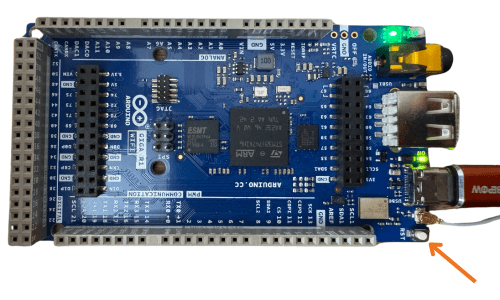
Yes, you heard me. Just double tap the reset button.
Is this Voodoo?
Wow – you care why this works? Good for you!
OK, here’s the deal…
The Arduino Giga runs something based on Mbed OS. It’s an operating system that runs on the Giga board.
If you upload a sketch to your Arduino Giga and it has issues (like using too much memory during runtime) then it’s possible that the operating system can crash while your program is running!
So good for you! You managed to crash an OS on a Giga board! (Another feather in your hat).
When you double-tap the reset button, it puts the Arduino Giga into bootloader mode, and prepares it to receive a new sketch when you press upload.
But here’s the catch…
If the new sketch you upload still has those runtime issues – you’ll just get that red blinking LED of death again!
So take a close look at your code and ask…why me! Why me!
The rough part is that many errors can slip right by the Arduino IDE during the verify and upload process.
It’s not the IDE’s fault – your code just has sneaky errors that only show their face when the program is actually running.
But I’m confident you’ll get this figured out! And if you need an extra hand, be sure to check out our training program 😉.









