
Using Arduino to measure RPM
Steve Stefanidis – March, 2025
The Story
So, one day, I see my teenage daughter playing with one of these fidget spinners.
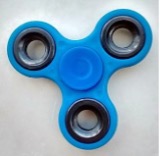
I say, “Hey, that’s cool. How fast do you think it is spinning?”
“I dunno,” she says.
“OK, so how would you find out?”
“No idea”, she responds.
“Hmm ok,. What means or tool can you use to help you estimate the rate of spin?”
“Haven’t got a clue…!” she concludes.
But then, after spinning it a few times, I started to wonder myself: what rate is it really rotating at? Is it 10 rpm, 50, 100…? I was intrigued. But, alas, you can’t count those rotations in real time or even come up with a good estimate.
How can you measure RPM with Arduino?
OK, so I delegated to bring Arduino to the rescue. I needed a way to first determine how to accurately detect each rotation. Could have used a hall effect sensor for this? But then, it would’ve required a metallic slab to be placed on each device under test – so that idea was out, due to it being impractical.
The other approach would involve some optical sensing, i.e., infrared. So, I had these line tracker sensors hanging around and I did a quick experiment to see how it will behave in terms of distance and response time.
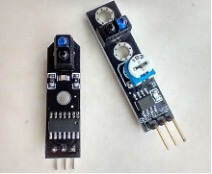
Those worked surprisingly well! The next task was to write up some code to sense the rotations and display some sort of a result to quickly validate the principle of operation.
Concerning selecting an Arduino board, since this is a fairly simple use-case, there was no real need to use anything exotic, so I used the Nano as the first try. After quickly writing some code to interrupt on every trip of the sensor, the proof of concept was realized.
But it was a bit hard to work with the actual fidget spinner, as it ties up both hands (one hand to hold it, and the other one to put the device into a spin) and leaves no bandwidth to do other things – as I don’t have 3 hands! Further, our natural friend friction takes effect and the spinner’s rpms slowly subside – and this is not too good when one wants to make an accurate measurement of the rotational frequency.
So, a more consistent spinner was required to do further code prototyping and development work. Luckily, I had this compact fan lying around which I found to be just perfect for this purpose.
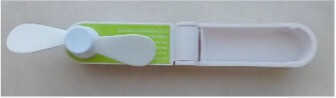
It can be operated at 3 speeds and keeps the rate of rotation quite constant at all of those 3 settings (low, medium, and high). It was a great source of input for our evolving measurement tool.
Adding a display to the RPM Monitor
After polishing off the measurement code and validating it on the serial monitor, it was felt that this baby can be made to be more stand-alone. That’s when the 128×64 OLED display was introduced to make things more compact and be USB-independent.
However, the use of the U8glib.h library tended to eat up a lot of SRAM space, pushing its consumption dangerously close to the Nano’s 2KB maximum. As a good compromise for a low form-factor, yet higher SRAM, the Arduino Pro Micro was selected. It has 2.5KB of SRAM on board and that was just perfect for this particular application.
Menu Driven Interface
But now that we had the luxury of an OLED screen, simply displaying a numerical rpm value looked kind of empty and humdrum. So, to spice things up, it was decided to show more stats on the screen and add a graphical representation of the rpm’s dynamic variance in real time (for better visualization of any trends that may be occurring).
There again was more code that had to be written to allow for these features to be implemented. And as more of those features were added, it was starting to get hard to select those features (pls see the video for a walk-through of those). There was no way out – this thing had to be menu-driven!
While maintaining a list of features that can be dynamically enabled/disabled, it was felt that it’s best to stick as much to a minimalist design as possible. Meaning, using the minimal number of external resources and hardware to still achieve full functionality (as the author always righteously believes 😊).
Hardware for navigating the menu
Yes, employing multiple pushbuttons to navigate through the menus is one simple and straightforward way of implementing this. But just for fun and coolness of the design, a strict requirement was set right at the start: only 1 pushbutton is to be used to operate the device and all the menus!
How? By using short or long presses of the button. I.e. when in the main screen showing the numerical results and the graph, a short press will reset the displayed values and clear the graph. A long press will bring up the Settings screen, where the menu will appear, and the user will be able to walk through the options and select any specific setting. Again, to navigate through the list, a short press is required; and to make a selection, a long press is needed. Further, no external pull-up or pull-down resistor is needed for the pushbutton, as Arduino’s internal INPUT_PULLUP was deployed on the input pin.
The last component that was needed was a small trim pot which is used to control the sweep rate of the plot. One could’ve just hard-coded this setting, but it was felt that dynamically altering the sweep rate would add more flexibility to the tool’s utilization. I.e. if the variation of the rpm’s changes is going at slow rate, then it’d be better to set the sweep rate to a longer setting. And conversely, if the signal is more dynamic, a shorter sweep rate setting will show the graph in a clearer fashion.
Arduino RPM Measurement Circuit Diagram
Here is how the assembled board looks like:
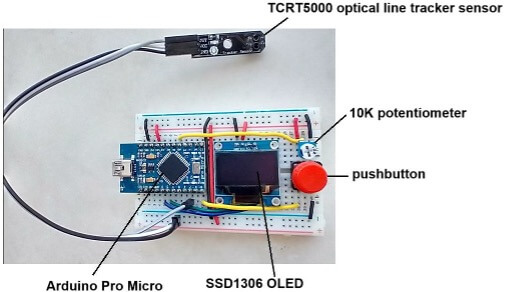
The end-goal was eventually achieved: the measurement tool ended up being stand-alone, powered by a USB power bank.
For reference, here’s the Fritzing sketch of the hardware:
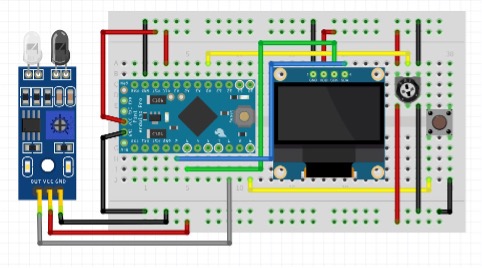
Also, the full code listing is provided in a separate .ino file below. There are minimal comments in there, but hopefully, the interested audience is fairly well-versed with the C language, as some of the constructs used are not necessarily trivial, especially for those who are just starting out with Arduino.
Note: it’s important to note that this device doesn’t perform an absolute measurement of rpm (revolutions per minute or rotations per minute). It merely measures the cycles per second (cps) of the instances when the IR sensor was tripped: i.e. it measures the frequency of how often the IR sensor is interrupted.
What is the RPM of a fidget spinner?!
So, for the fidget spinner (which has 3 arms) if the reported measurement is 30 cps, then the actual rpm will be (30 / 3) x 60 = 600 rpm.
Similarly for the fan (which has 2 blades), if the reported measured cycles per second is 100 cps, then the actual rpm will be (100 / 2) x 60 = 3000 rpm.
As it’s not immediately obvious to the device how many arms/blades the rotating object has, it’s not straightforward to incorporate such information into the design. So, one will need to appropriately scale the measured result in accordance with the physical layout of the rotating device, as shown in the two examples above.
Arduino Code for measuring rotations:
// ---------------------------------------------------------------------------------------------------------------
//
// Frequency measurement tool
// Uses Arduino Pro Micro, TCRT5000 optical line tracker sensor, SSD1306 OLED, pushbutton and a 10K potentiometer.
//
// (c) Steve Stefanidis - March, 2025
//
// ---------------------------------------------------------------------------------------------------------------
#include <U8glib.h>
#define SIGNAL_PIN 7
#define BUTTON_PIN 9
#define SWEEP_ADJ_PIN A0
// For debugging...
#define DISP_FPS_IN_MAIN 0
#define DISP_FPS_IN_SETTINGS 0
volatile boolean gotNewSample = false;
volatile unsigned long samplePeriodInuS;
unsigned long previousTime = 0, prevSweepTime, prevRefreshTime;
int screenWidth, screenHeight;
// Data structure containing pertinent information
struct _params
{
volatile unsigned long counter;
unsigned long periodInuS;
unsigned int instFreq;
unsigned int avgFreq;
unsigned int min;
unsigned int max;
unsigned int timeBase;
unsigned int x;
unsigned int y;
bool reset;
bool maxReached;
} params = {0};
// Menu definition and contents
#define NUM_MAINLIST_ENTRIES 4
#define MAX_SUBLIST_ENTRIES 5
struct _menu
{
byte mainListSz = NUM_MAINLIST_ENTRIES;
byte maxSublistEntries = MAX_SUBLIST_ENTRIES;
byte mainListActiveIdx;
byte subListSz[NUM_MAINLIST_ENTRIES];
byte subListActiveIdx[NUM_MAINLIST_ENTRIES];
bool mainMenuActive;
const char *mainList[NUM_MAINLIST_ENTRIES] =
{"Plot Type:", "Max fps :", "Average :", "Exit"}; // Exit should be the very last entry in this list
const char *subList[NUM_MAINLIST_ENTRIES][MAX_SUBLIST_ENTRIES] = {
{"Non-persistent", "Persistent", "Single pixel"}, // submenu entries for the 1st main menu option
{"50", "100", "150", "200", "250"}, // submenu entries for the 2nd main menu option
{"Disabled", "Enabled", "Keep Last"}, // submenu entries for the 3rd main menu option...
{""}, // this should be the very last entry (for Exit) - do not change !
};
} menu;
// Use the I2C version with optimal settings
U8GLIB_SSD1306_128X64 u8g(U8G_I2C_OPT_DEV_0 | U8G_I2C_OPT_NO_ACK | U8G_I2C_OPT_FAST);
// Interrupt Service Routine (ISR) to measure the periods between samples
void getTimeISR(void) {
unsigned long currentTime = micros();
samplePeriodInuS = currentTime - previousTime;
previousTime = currentTime;
gotNewSample = true;
params.counter++;
}
// Central routine to display the image on the SSD1306 OLED display
void DisplayResultsOnLEDScreen(struct _params *p)
{
int frame = 0;
static byte data[128] = {0};
// Pre-form all the strings that we'll need to display
char myStr[6][16];
sprintf(myStr[0], "%ld", p->counter);
sprintf(myStr[1], "%ld.%1ld", p->periodInuS / 1000UL, (p->periodInuS % 1000UL) / 100UL);
sprintf(myStr[2], "%d", p->timeBase);
sprintf(myStr[3], "%d", p->instFreq);
sprintf(myStr[4], "%3d - %3d", p->min, p->max);
sprintf(myStr[5], "%3d", p->avgFreq);
// If reset was pressed, clear the plot's historical values
if (p->reset == true)
{
p->reset = false;
for (int i = 0; i < screenWidth; i++)
data[i] = screenHeight - 1;
}
// Save the plot data in our array
data[p->x] = p->y;
u8g.firstPage();
do {
const int fontHeight = 7, offset = 53;
if (frame < 4)
{
// Render all of the stats in the top half of the screen (i.e. frames 0-3) for better performance
u8g.setFont(u8g_font_04b_03r); // use small font for stats
u8g.drawStr(0, fontHeight*1, "Count (cyc)");
u8g.drawStr(offset, fontHeight*1, myStr[0]);
u8g.drawStr(0, fontHeight*2, "Period (ms)");
u8g.drawStr(offset, fontHeight*2, myStr[1]);
u8g.drawStr(0, fontHeight*3, "Sweep (ms)");
u8g.drawStr(offset, fontHeight*3, myStr[2]);
u8g.drawStr(0, fontHeight*4, "Freq (Hz)");
u8g.drawStr(offset, fontHeight*4, myStr[3]);
u8g.drawStr(86, fontHeight*4, myStr[4]); // freq min, max values
u8g.drawLine(82, 0, 82, fontHeight*4); // vertical line separator
u8g.setFont(u8g_font_fur17r); // use large font for Avg Freq
u8g.drawStr(89, 20, myStr[5]); // average Freq value
}
else
{
// Render the graphics content in the bottom half of the screen (i.e. frames 4-7) for better performance
if(p->maxReached)
{
// Display a notification if we've exceeded the maximum allowed y-value
u8g.setFont(u8g_font_04b_03r);
u8g.drawStr(40, 7 * screenHeight / 8, "Maxed Out !!");
}
switch(menu.subListActiveIdx[0])
{
case 0: // non-persistent plot
for(int i=0; i < p->x; i++)
u8g.drawPixel(i, data[i]);
break;
case 1: // persistent plot
for(int i=0; i < p->x; i++)
u8g.drawPixel(i, data[i]);
for(int i=p->x+1; i < 128; i++)
u8g.drawPixel(i, data[i]);
break;
case 2: // draw just one pixel
u8g.drawPixel(p->x, p->y);
break;
}
}
frame++;
} while (u8g.nextPage());
}
// Function to advance the menu entry counter for both the main and sub menus
void advanceMenuIdx(struct _menu *m)
{
if(m->mainMenuActive)
{
if(!(++m->mainListActiveIdx % m->mainListSz))
m->mainListActiveIdx = 0;
}
else
{
if(!(++m->subListActiveIdx[m->mainListActiveIdx] % m->subListSz[m->mainListActiveIdx]))
m->subListActiveIdx[m->mainListActiveIdx] = 0;
}
}
// Function to display the Settings screen
void dispSettings()
{
int i, j, menuStart_x, menuStart_y, menuHeight, mainListWidth = 0, subListWidth = 0;
unsigned long prevRefreshTimeSettings = 0;
static unsigned long prevButtonTime = 0;
bool buttonPressed = false;
static bool doOnce = false;
char buf[32];
if(doOnce == false)
{
// Determine the number of submenu entries for each main menu entry
for (int i=0; i < menu.mainListSz; i++)
{
for (int j=0; j < menu.maxSublistEntries; j++)
{
if(menu.subList[i][j])
menu.subListSz[i]++;
}
}
doOnce = true;
}
// Set up the gfx font for menus
u8g.setFont(u8g_font_profont10r);
menuHeight = u8g.getFontAscent() - u8g.getFontDescent();
// Find the max lengths of the longest main menu and submenu entry strings
for(i = 0; i < menu.mainListSz; i++)
{
int curWidth;
// Find the length of the longest main menu string
if((curWidth = u8g.getStrWidth(menu.mainList[i])) > mainListWidth)
mainListWidth = curWidth;
// Find the length of the longest submenu entry string
for(j = 0; j < menu.subListSz[i]; j++)
{
if((curWidth = u8g.getStrWidth(menu.subList[i][j])) > subListWidth)
subListWidth = curWidth;
}
}
mainListWidth += 2; // add extra padding of 1 pixel at start and 1 at the end
subListWidth += 2; // add extra padding of 1 pixel at start and 1 at the end
// Centre the menu horizontally
menuStart_x = (screenWidth - (mainListWidth + subListWidth)) / 2;
menuStart_y = 20;
// Set the active main list entry to the last one: Exit
menu.mainListActiveIdx = menu.mainListSz - 1;
menu.mainMenuActive = true;
// Keep looping until "Exit" is pressed
while(1)
{
u8g.firstPage();
do {
// Set up the gfx font for title and display it
#define SETTINGS_STR_NAME "Settings"
u8g.setFont(u8g_font_profont12r);
u8g.drawStr((screenWidth - u8g.getStrWidth(SETTINGS_STR_NAME)) / 2, u8g.getFontAscent() - u8g.getFontDescent(), SETTINGS_STR_NAME);
// Set up the gfx font for menus
u8g.setFont(u8g_font_profont10r);
u8g.setFontPosTop();
for(i = 0; i < menu.mainListSz; i++)
{
if (i == menu.mainListActiveIdx)
{
// Display in inverse for an active main entry
u8g.drawBox(menuStart_x-1, menuStart_y+i*menuHeight+1, mainListWidth, menuHeight+1);
u8g.setDefaultBackgroundColor();
}
u8g.drawStr(menuStart_x, menuStart_y+i*menuHeight+1, menu.mainList[i]);
u8g.setDefaultForegroundColor();
if (menu.subListActiveIdx[i] < menu.subListSz[i])
{
// Display the active submenu entry for this main menu entry
if (i == menu.mainListActiveIdx && menu.mainMenuActive == false)
{
// Draw a frame around the submenu entry
u8g.drawFrame(menuStart_x+mainListWidth, menuStart_y+i*menuHeight+1, subListWidth+1, menuHeight+1);
}
// Display the sublist menu entry
sprintf(buf, "%s", menu.subList[i][menu.subListActiveIdx[i]]);
u8g.drawStr(menuStart_x+mainListWidth+2, menuStart_y+i*menuHeight+1, buf);
}
}
} while (u8g.nextPage());
// Display the Settings screen fps
unsigned long currSweepTimeSettings = micros();
#if DISP_FPS_IN_SETTINGS
Serial.println(1000000.0 / (currSweepTimeSettings - prevRefreshTimeSettings), 2);
#endif
prevRefreshTimeSettings = currSweepTimeSettings;
// Check the button for either a Short or Long press (from Settings menu)
if (!digitalRead(BUTTON_PIN) && !buttonPressed)
{
// Button just got pressed
prevButtonTime = currSweepTimeSettings;
buttonPressed = true;
delay(100); // small debounce time
}
else if (digitalRead(BUTTON_PIN) && buttonPressed)
{
// Button just got released
if(micros() - prevButtonTime >= 500000)
{
// Detected a Long button press ( > 0.5 secs )
delay(100); // small debounce time
while(!digitalRead(BUTTON_PIN));
// Flip focus from main <-> sub menu
menu.mainMenuActive = !menu.mainMenuActive;
// If last main menu entry (Exit) is selected, get out of the Settings page
if(menu.mainListActiveIdx == menu.mainListSz - 1)
{
// "Exit" pressed; exit the function
return;
}
}
else
{
// Detected a Short button press - advance to the next menu entry
advanceMenuIdx(&menu);
}
buttonPressed = false;
}
}
}
void setup()
{
Serial.begin(9600);
Serial.println("\nStarting RPM Monitor");
pinMode(SIGNAL_PIN, INPUT);
pinMode(BUTTON_PIN, INPUT_PULLUP);
pinMode(SWEEP_ADJ_PIN, INPUT);
screenWidth = u8g.getWidth();
screenHeight = u8g.getHeight();
Serial.print("LCD screen size: ");
Serial.print(screenWidth);
Serial.print("x");
Serial.println(screenHeight);
// Clear the OLED screen
u8g.firstPage();
do {} while(u8g.nextPage());
// Set up main menu defaults, as needed
menu.subListActiveIdx[1] = 2; // Default Max fps = 150
// Attach an Interrupt Service Routine (ISR) to our signal pin
attachInterrupt(digitalPinToInterrupt(SIGNAL_PIN), getTimeISR, RISING);
}
void loop()
{
char myStr[64];
unsigned long currTimeInUs, sweepThres, sweepTimeInuS;
static unsigned long prevButtonTime = 0, prevFlashTime = 0;
if (gotNewSample || params.reset == true)
{
noInterrupts();
params.periodInuS = samplePeriodInuS;
gotNewSample = false;
interrupts();
}
else
{
if(menu.subListActiveIdx[2] != 2) // Keep last inst freq?
params.periodInuS = 0;
}
// Compute instantaneous frequency in Hz
params.instFreq = params.periodInuS ? 1000000UL / params.periodInuS : 0;
// Act on certain menu settings
if(menu.subListActiveIdx[2] == 0)
{
// Smoothing disabled
params.avgFreq = params.instFreq;
}
else if(menu.subListActiveIdx[2] >= 1)
{
// Smoothing enabled; compute the running average
#define N 8 // 16
static float avg = 0;
avg = (avg * ( N - 1) + params.instFreq) / N;
params.avgFreq = avg;
}
// Track the min and max fps values
params.min = (params.instFreq < params.min) ? params.instFreq : params.min;
params.max = (params.instFreq > params.max) ? params.instFreq : params.max;
// Compute the RPM and do other relevant checks
currTimeInUs = micros();
sweepThres = 1 + analogRead(SWEEP_ADJ_PIN) * 250UL;
sweepTimeInuS = currTimeInUs - prevSweepTime;
if(sweepTimeInuS > sweepThres)
{
// The sweep time period controls when we'll accept the latest sample for the plot
params.timeBase = (int)(sweepTimeInuS / 1000UL);
// Compose the x and y values for our plot
if(++params.x >= screenWidth)
params.x = 0;
// Integer implementation (optimized) - TODO: do auto-ranging !
int dataRange = 50.0 + menu.subListActiveIdx[1] * 50;
params.y = (screenHeight - 1) - (params.avgFreq * (screenHeight >> 1)) / dataRange;
// See if the maximum y-value has been exceeded
if(params.y < screenHeight / 2)
{
params.y = screenHeight / 2 - 1;
if(currTimeInUs - prevFlashTime > 250000UL)
{
// Flash the msg with a period of ~ 1/4 of a second
params.maxReached ^= 1;
prevFlashTime = currTimeInUs;
}
}
else
{
params.maxReached = false;
}
prevSweepTime = currTimeInUs;
}
// Check the button for either a Short or Long press (from Main menu)
if (!digitalRead(BUTTON_PIN))
{
prevButtonTime = micros();
delay(100);
while(micros() - prevButtonTime < 500000)
{
if (digitalRead(BUTTON_PIN))
{
// Short press ( < 0.5 secs ) detected - reset the parameters
params.reset = true;
params.x = 0;
params.counter = 0;
params.min = params.max = 0;
samplePeriodInuS = 0;
return;
}
}
// Long press detected - go into the Settings screen
while(!digitalRead(BUTTON_PIN));
delay(100);
dispSettings();
}
#if DISP_FPS_IN_MAIN
// Display the main screen period and fps
Serial.print("Main: per(ms)=");
Serial.print((currTimeInUs - prevRefreshTime) / 1000.0, 1);
Serial.print(", freq(fps)=");
Serial.println(1000000.0 / (currTimeInUs - prevRefreshTime), 1);
prevRefreshTime = currTimeInUs;
#endif
DisplayResultsOnLEDScreen(¶ms);
}









Great project but it’s a pity there isn’t a link to the code??
Sorry about that Lee – just added the code!