
Basic Home Automation Using Arduino :: Student Project
Paul has begun to automate his home by using an Arduino to batch together tasks that once each required attention.
This project was submitted by one of our members. You can see more of our member's projects here.
Not a member yet? Sign up here.
Batching is a great way to jump into home automation, especially when you can identify things that you almost always do at the same time and require multiple switch flips/button presses, etc.
When Paul turned his TV on, he almost always turned on his HDD recorded with it. Plus he liked the room lamp turned on.
Using an Arduino, Infrared LED, RF transmitter, RF controllable sockets and a light sensor he was able to batch all these steps together with a single button press – and have them work in smart way.
For example, the light will only come when the room is dark, and it will turn off automatically if the room gets bright.

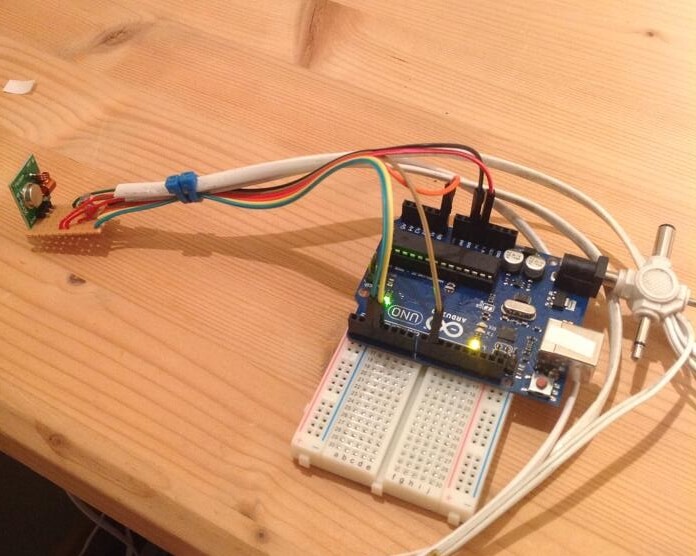
Here is a picture of the controller he put together:
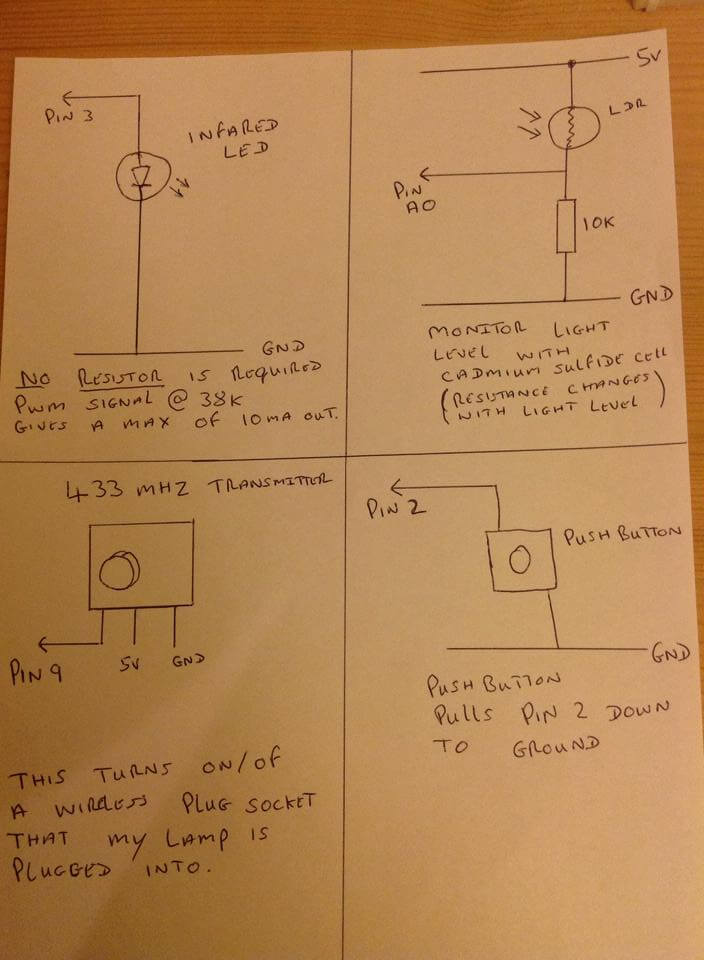
Here are some of his notes as he was making the setup:
Here is a look at his code:
/* This Code
   Turns On Lamp (wireless) Tv and Hdd Recorder (Infared) with a short press of the button
   and Turns then off with a Long press of the button
   added in V4 Light sensor to only turn on lamp when its Dark.
   V5 Added lamp turning off if room gets to light.
   V6 the lamp is now continually monitoring the light level and will automatically turn ON/OFF
   with light level, while ever the TV is turned on (room is ocupied)
   conect IR Led to pin 3
   conect Transmitter to pin 9
   conect Button to pin 2 and Gnd

 by Paul Meynell

 This example code is in the public domain.
*/

 #include <IRremote.h>             // include Infared Library by Ken Shrriff
 #include <RCSwitch.h>             // include Wirless Transmitter Library

IRsend irsend;
RCSwitch mySwitch = RCSwitch();

int pressLengh = 0;             // lenght button is pressed for
int longPress = 5;              // number counted in seconds a long press of the button
const int buttonPin = 2;        // the number of the pushbutton pin

int lightLevel = 0;
int tooLight = 520;             // lightness and darkness Thresholds
int tooDark = 520;
int lightLevelComp  = 10;       // light level compensation to keep on/off switch overs stable ans stop flashing
                                // creates a buffer between light on and light off values
int lampState = 0;              // Track lamp stste on/off
int tvState = 0;                // Track TV stste on/off

void setup()
{
     pinMode(buttonPin, INPUT_PULLUP);             // initialize the pushbutton pin as an input with pullup
     Serial.begin(9600);                           // conecting to Gnd = high
     mySwitch.enableTransmit(9);                   // Enables Wirless Transmitter

}                                  // close setup

  void loop() {


      while (digitalRead(buttonPin) == LOW )  { pressLengh = pressLengh++;   delay(100);   }          // pressLengh counts up in seconds while button is pressed


      lightLevel = analogRead(A0);                                              // check Light sensor


 // LONG PRESS Turns off Lamp (wirless) TV and HDD Recorder (Infared)

     if (pressLengh > longPress)

     {
        tvState = 0;                          // Track TV state change to OFF
        mySwitch.send(5396, 24);              // Wirless Lamp OFF Signal
        lampState = 0;                        // Track lamp state change to OFF


       // NEC
      irsend.sendNEC(0x800FF, 32);           // sends NEC: 800FF (32 bit)
                                             // OFF comand to Humax Box

      for (int i = 0; i < 3; i++) {
      irsend.sendSony(0xa90, 12);            // sony TV  OFF
      delay(40);
 }                                // close for stat

  }                                // close if stat


      // SHORT PRESS  Turn on TV and HDD Recorder (Infared)

      if (pressLengh > 1 && pressLengh < longPress)

      {

       tvState = 1;                         // Track TV state change to ON

      // NEC
      irsend.sendNEC(0x800FF, 32);           // sends NEC: 800FF (32 bit)
                                             // on comand to Humax Box

      for (int i = 0; i < 3; i++) {
      irsend.sendSony(0xa90, 12);            // sony TV  ON
      delay(40);
 }                                 // close for stat

  }                                // close if stat


    // AUTO LAMP ON/OFF, by light level, while TV is turned on


      if (tvState == 1) {                                                                           // check if TV is ON, if so auto control Lamp

      if (lightLevel < tooDark && lightLevel < tooDark - lightLevelComp && lampState == 0)          // check if room is too DARK

      {

        mySwitch.send(5393, 24);                                                                    // Wirless Lamp ON Signal
        lampState = 1;                                                                              // Track lamp state change to ON

      }                                    // close wirless IF stat


      if (lightLevel > tooLight && lightLevel > tooLight + lightLevelComp && lampState ==1)          // check if room is too LIGHT

      {

        mySwitch.send(5396, 24);                                                                     // Wirless Lamp OFF Signal
        lampState = 0;                                                                               // Track lamp state change to OFF

      }                        // Close if stat
  }                            // close if stat


      pressLengh = 0;          // Reset pressLengh to zero, ready for next button press

  }                            // close void loop
Pretty impressive stuff! Feel free to post questions for Paul, I am sure he would be willing to talk about the finer points of the setup.









