
Clock Stop – Getting time just right with Arduino :: Member Project
Pendulum clocks have great sounding chimes – especially when they are paired up with Arduino to make sure those chimes happen right on time. Check out this project by Bill Bryan, a member of Programming Electronics Academy. Bill submitted this cool project that uses a wireless module, servo motor, OLED display, and more to make sure his clocks’ chimes come in right on time.
Why did you build this Arduino project?
I have a mechanical pendulum clock that won’t keep good time.
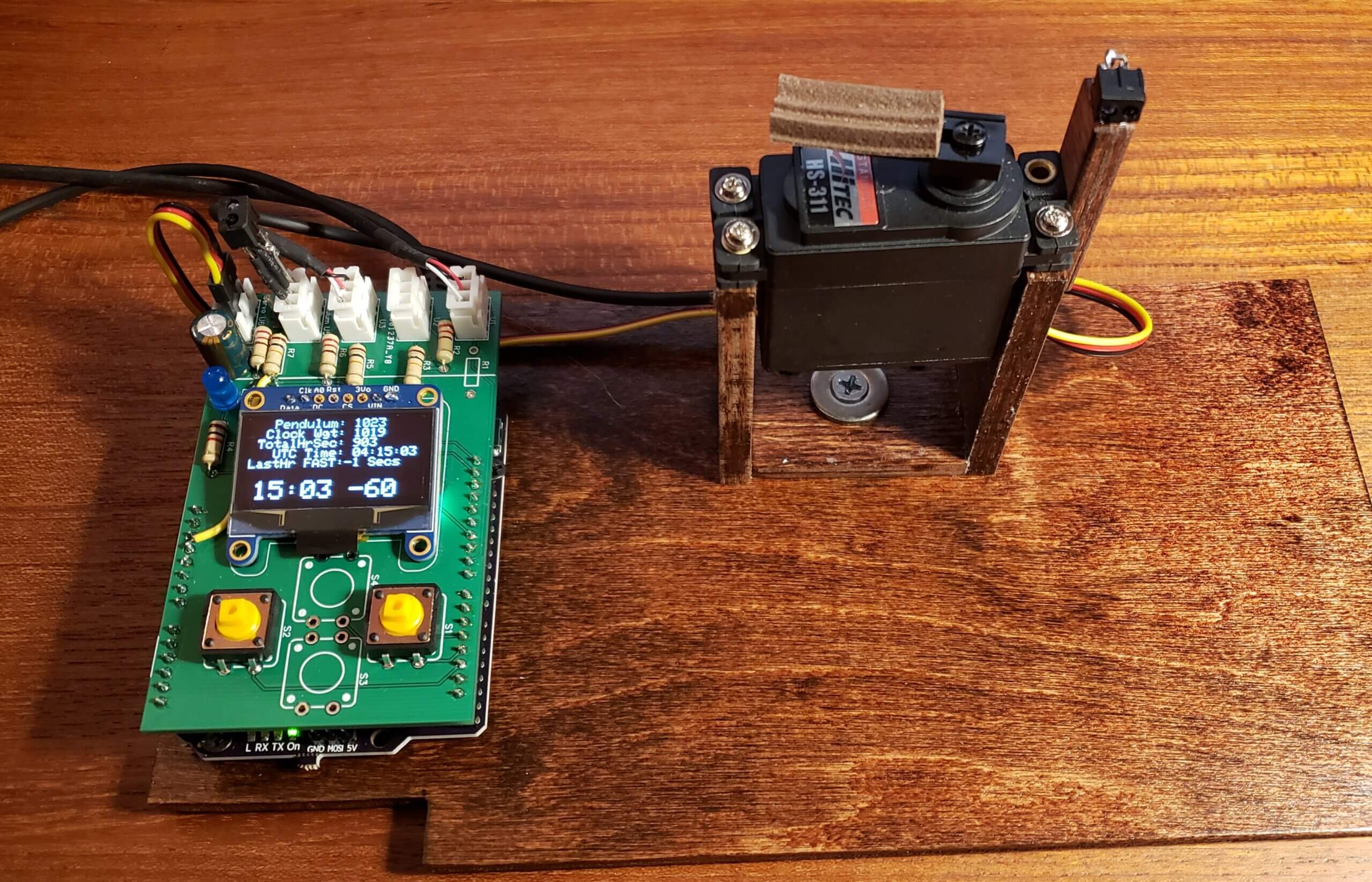
This program gets the time from the internet. It compares this time to the first strike of a chime hammer. The program will stop the pendulum if the clock is running fast.
I can’t speed the clock up, but I can slow it down by stopping the pendulum.
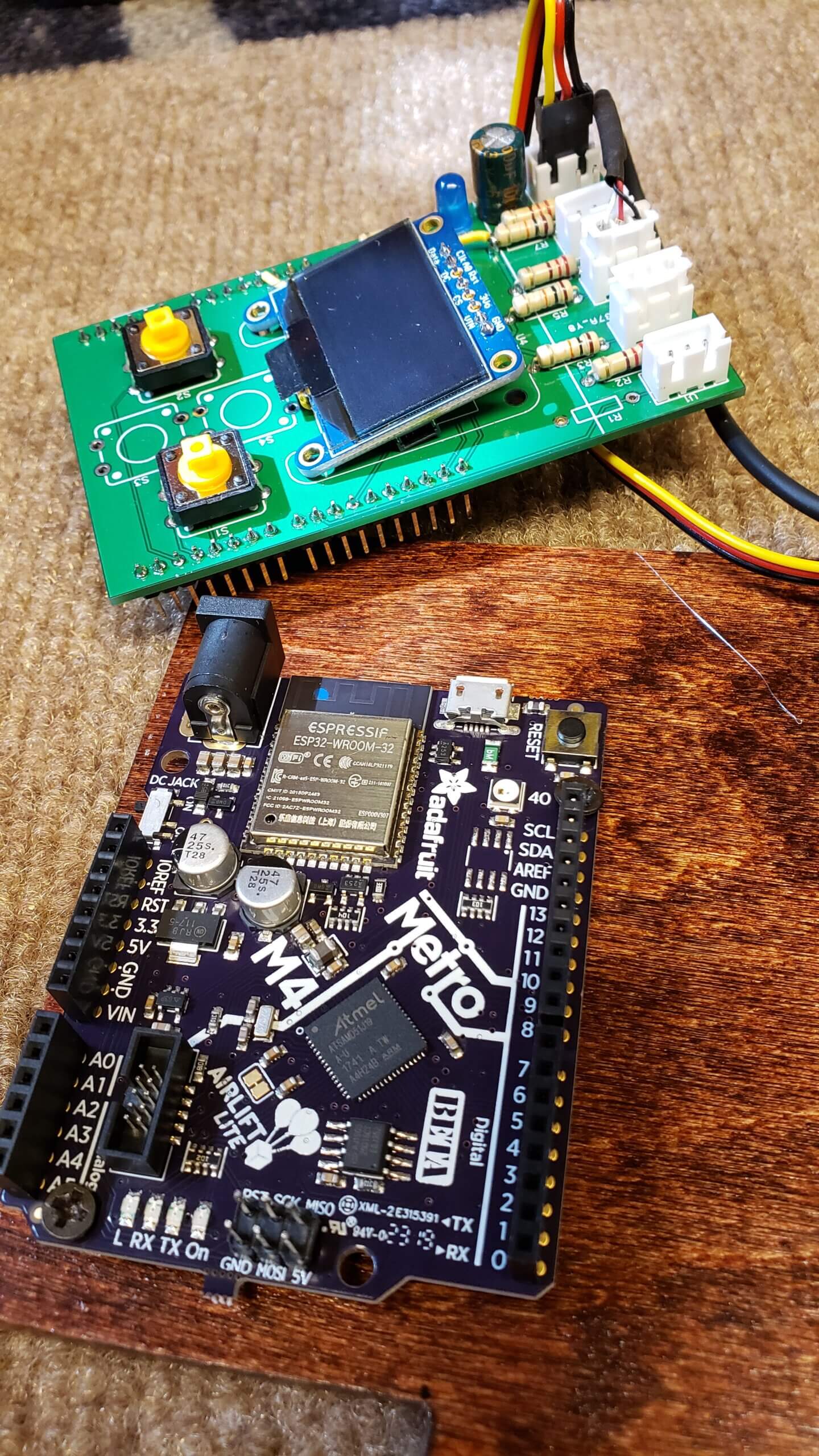
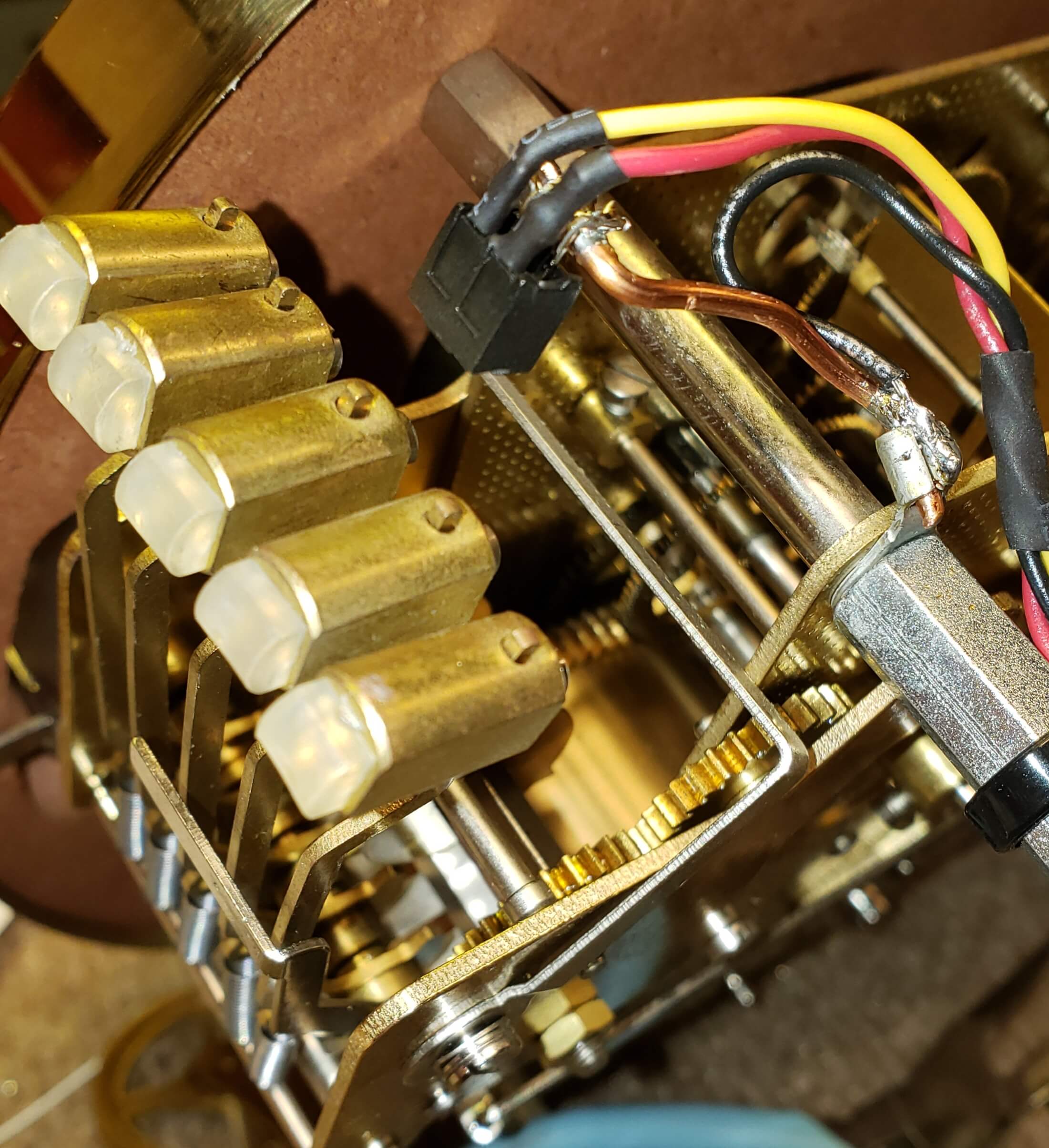
There are 3 IR emitter/sensors.
- One on the first chime, note, strike hammer
- One for the pendulum to locate where its located
- One for the clock weights when they reach the bottom of the clock
What type of Arduino board does your project use?
Adafruit Metro M4 Express AirLift (WiFi) – Lite
What was your biggest struggle as you worked through this project?
Timing aspects on stopping the pendulum. The program holds the time to about a second. I’m still making additions.
Was the training at Programming Electronics Academy able to help you build your skill?
Yes. It was Fantastic…
About Bill Bryan

Bill is now retired, but worked in sound studios and digital cinema projection. He has been into electronics for over 60 years. Bill just started doing C++ a couple of years ago, but had been doing some Quick Basic programming in times past. He says he is a bit of a time freak, hence this project, which allows him to hear the chime of the clock through his house on time.
You can download the schematic here.
Arduino Code:
/*
---------------------------------------------------------------
CLOCK STOP Ver: 5 With NTP Client
Ver: 5 using IR sensor on 3rd hammer
and display sleeping
written by: Bill Bryan 3/19/20 Final Update 6/5/20
changed time service and restored 0 second offset
added 1/4 hour time grabs and other fixes.
for Adafruit Metro M4 Lite and SSD1306 OLED display
----------------------------------------------------------------
*/
#include <NTPClient.h>
#include <WiFiUdp.h>
#include <WiFiNINA.h>
#include <Adafruit_SSD1306.h>
#include <splash.h>
#include <Servo.h>
#include <Adafruit_SleepyDog.h>
const char *ssid = "ssid";
const char *password = "password";
WiFiUDP ntpUDP;
// By default 'pool.ntp.org' is used with
// 60 seconds update interval and no offset
NTPClient timeClient(ntpUDP, "utcnist.colorado.edu", 0, 600000); // BB mod for 10 minute updates, 1 min updates 60,000
//NTPClient timeClient(ntpUDP); // original
//NTPClient timeClient(ntpUDP, "pool.ntp.org", 1, 600000); // BB mod for 10 minute updates, 1 min updates 60,000
// changed 0000 to 0001 (1 sec) to help fix propagation delay
// 5/1/20 turned back 0000 makes correct UTC hours 3600/hour
// You can specify the time server pool and the offset, in seconds)
// additionally you can specify the update interval (in milliseconds).
Adafruit_SSD1306 display = Adafruit_SSD1306(128, 64, &Wire); //Setup for OLED dispaly
Servo myservo; // create servo object to control a servo
int setAhead = 0; //set ahead for testing. 58 during testing...BB
const int weightsThreshold = 512; //point where weights are to low. Was 800. Lowered for sunlight
const int pendulumThreshold = 800; //point where we see the pendulum was 900. Lowered for sunlight
const int beforeTop = 3540; //1 min is 3540 seconds before top of hour
const int afterTop = 60; //check 60 secs after top of hour. how slow are we?
int rawHour = 0; //varible for NTP hours
int rawMin = 0; //varible for NTP minutes
int rawSec = 0; //varible for NTP seconds
int displayMin = 0; //display UTC minutes
int displaySec = 0; //display UTC seconds
int lastClockSpeed = -60; //fast or slow amount last hour
int totalHourSec = 0; //1 hour total seconds = 3600
int pendulumLevel = 0; //pendulum level 0-1023
int weightsLevel = 0; //STOP CLOCK if below ???
int weightsCounter = 0; //used to see if weights are truely below threshold
int currentDisplaySec = 0;
int holdSecOffset = 0; //hold all the offsets for averaging
int zeroSecOffset = -60; //was -120. changed to -60
float loopCounter = 0; //used for offset averaging loop counter. Float for math
float averageSecOffset = 0; //offset averaging. Float for math division
const unsigned long activeDisplayTime = 150000; //display is on for 2-1/2 minutes in mills
const unsigned long activeWeightsTime = 1800; //wait 1/2 hour in seconds to stop entire clock
unsigned long currenTime = 0; //current millis()
unsigned long displayOnStarTime = 0; //start time for active display on time after sleep
unsigned long previousTime = 0; //previous millis() for 1 second loop
unsigned long pendulumTime = 0; //how long have we waited for the pendulum
unsigned long swingTime = 0; //pendulum swing timer
const unsigned long evenTime = 1000; //the one second loop
unsigned long starTimer = 0; //number of seconds to use during holdback while loop
unsigned long endTimer = 0; //end of hold back timer
unsigned long timeToHoldBack = 0; //number of seconds to holdback pendulum
unsigned long weightsOnStarTime = 0; //start timer for weights in view 30 seconds to stop entire clock
String ntpDisplay = "00:00:00"; //character for NTP display
const byte servoHome = 32; //home position for servo
const byte servoHold = 118; //hold position for servo
//const byte soundPin = 8; //pin used for chime detection (NOT USED ANYMORE)
const byte futurePin = 9; //pin used for hammer sensor
const byte ledPin = 11; //output pin for blue LED. HIGH lights it
const byte servoPin = 10; //output pin for servo
const byte leftButton = 2; //left button (servo testing. gate closed)
const byte rightButton = 3; //right button (servo testing. gate open)
const byte pendulumPin = 0; //pendulum connected to A0
const byte weightsPin = 1; //clock weights connected to A1
byte timerStatus = 0; //0-7 depending on state of action
boolean buttonFlag = false ; //needed for push button test of pendulum servo
boolean beforeTopHourWindow = false; //Top of hour window allows holdbacks and prevents false triggers
boolean afterTopHourWindow = false; //after top of hour window to see how slow we're running
boolean pendulumFlag = false; //flag needed for low weights shutdown
boolean soundFlag = false; //flag for chime detection
boolean displayOn = true; //true = display on
boolean hammerFlag = false; //flag chime hammer strike cocking
void setup() { // Start of Void Setup +++++++++++++++++++++++++++++++++++++
digitalWrite(ledPin, LOW);
pinMode(futurePin, INPUT_PULLUP); //IR sensor mounted above 3rd chime hammer. Hit = LOW
//pinMode(soundPin, INPUT); //Future input no used instead. (NOT USED ANYMORE)
pinMode(ledPin, OUTPUT);
pinMode(servoPin, OUTPUT);
pinMode(leftButton, INPUT_PULLUP);
pinMode(rightButton, INPUT_PULLUP);
pinMode(pendulumPin, INPUT_PULLUP);
pinMode(weightsPin, INPUT_PULLUP);
// code for OLED display to run once:
display.begin(SSD1306_SWITCHCAPVCC, 0x3D); // Address 0x3C for 128x32
display.display();
display.setTextSize(1);
display.setTextColor(WHITE);
display.clearDisplay();
display.setCursor(0, 0);
WiFi.begin(ssid, password);
while ( WiFi.status() != WL_CONNECTED ) {
delay(1000);
display.println ( "WiFi Login... " );
display.println("");
display.print("SSID: ");
display.print(ssid);
display.display();
WiFi.begin(ssid, password);
}
timeClient.begin();
myservo.attach(10); // attaches the servo on pin 10 to the servo object
myservo.write(servoHome); // tell servo to go to release position
Serial.begin(9600);
int countdownMS = Watchdog.enable(8000); // set Watchdog timer to 8 seconds to clear lockup
displayOnStarTime = millis(); // Set time out for initial display on timer.
// for testing only +++++++++++++++++++++++++++++++++++++++++++++++++++++++++++++
// ntpDisplay = timeClient.update(); //get the UTC string for display if we need it
//
// rawMin = timeClient.getMinutes();
// setAhead = (58 - rawMin);
//
// for testing only +++++++++++++++++++++++++++++++++++++++++++++++++++++++++++++
} // End of Setup --------------------------------------
void loop() { //++++++++++++++++++++++++++++++++++++++++++++++++++++++++++++++++++
currenTime = millis(); //hold the current millis()
// **************************************
// *** START OF ONE SECOND LOOP ***
// **************************************
if ((currenTime - previousTime) >= evenTime) { // one second loop
previousTime = currenTime;
Watchdog.reset(); //reset Watchdog timer back to zero
ntpDisplay = timeClient.update(); //get the UTC string for display
rawMin = timeClient.getMinutes();
rawSec = timeClient.getSeconds();
// for updating display time to 58 minutes +++ TESTING ONLY +++
displayMin = rawMin + setAhead; //setAhead = 0 in normal operation. 58 when used in testing
if (displayMin >= 60) {
(displayMin = displayMin - 60);
}
displaySec = rawSec;
pendulumLevel = analogRead(pendulumPin); //get level for display
weightsLevel = analogRead(weightsPin); //get level for display
totalHourSec = (displayMin * 60) + displaySec; //calc total current seconds in the hour
/*
*** Set timerStatus depending on conditions ***
0 = Below window
1 = In before window
2 = In after window
3 = In before window with chime
4 = In after window with chime
5 = Servo arm in the hold position
6 = Servo arm now ready for release
7 = Done with hold back
8 = timer halt for pendulum weight
9 = 15, 30, 45 minute display holds
___________________________________________________________________________
*/
if ((totalHourSec > beforeTop) && (!soundFlag)) { // we're in the before top window.
timerStatus = 1; // 1 = in the before top window
}
if ((totalHourSec > 0) && (totalHourSec <= afterTop) && (timerStatus <= 1)) { // we're in the after top window
timerStatus = 2; // 2 = in the after top window
}
if ((soundFlag) && (timerStatus == 1)) { // 3 = before top and chime
timerStatus = 3;
}
if ((soundFlag) && (timerStatus == 2)) { // 4 = after top and chime
timerStatus = 4;
AvgLoop(); // do averaging and loop counter (once an hour)
}
if ((timerStatus == 1 ) && (!soundFlag)) { // lets down count if we're in the before window and no chime
++zeroSecOffset;
}
if ((timerStatus == 2 ) && (!soundFlag)) { // lets down count if we're in the after window and no chime
++zeroSecOffset;
}
if (totalHourSec == 870 || totalHourSec == 871) { // set flag for the first quarter hour display and captures
timerStatus = 9;
}
if (totalHourSec == 1770 || totalHourSec == 1771) { // set flag for the second quarter hour display and captures
timerStatus = 9;
}
if (totalHourSec == 2670 || totalHourSec == 2671) { // set flag for the third quarter hour display and captures
timerStatus = 9;
}
// **** Final varible clean up ****
if (totalHourSec == afterTop) { // time for final clean up now that we're 60 seconds past top of the hour
timerStatus = 0; // 0 = back to the bottom of the hour window
soundFlag = false;
zeroSecOffset = -60; // reset offset counter
}
//
// *** Routines for waking the display from sleep mode ***
//
if (weightsLevel < weightsThreshold) { //read the weights IR sensor for activating the display out of sleep mode
displayOn = true;
displayOnStarTime = currenTime; // save current time for the display active timer
}
if (currenTime > (displayOnStarTime + activeDisplayTime) && (displayOn)) { // turn display off if 2-1/2 minutes 150000ms have past
displayOn = false; // turn off only if display was true
display.clearDisplay(); // clear display since we're sleeping again
display.display(); // show an empty screen
}
// *** TURN ON AND OFF DISPLAY DURING THE HOUR ***
// Turn on display top of the hour
if (totalHourSec == 3525 || totalHourSec == 3526 ) { //turn on display 75 seconds before top of the hour, every hour
displayOn = true ; //added extra second if update caused a miss.
displayOnStarTime = currenTime; //start display on timer
}
if (totalHourSec == 75) { //turn off display 75 seconds after top of the hour, every hour
displayOn = false ;
}
// Turn on display 1/4, 1/2, 3/4 hour
if (timerStatus == 9) { //turn on display 30 seconds before each quarter hour, every hour
displayOn = true ;
displayOnStarTime = currenTime; //start display on timer
}
//turn off display after 60 seconds and clean up
if (totalHourSec == 930 || totalHourSec == 931 || totalHourSec == 1830 || totalHourSec == 1831 || totalHourSec == 2730 || totalHourSec == 2731 ) {
displayOn = false ;
displayOnStarTime = 0; // reset display on timer
timerStatus = 0; // 0 = back to the bottom of the hour window
zeroSecOffset = -60; // reset offset counter
}
//
// *** Low Weights Shutdown ***
//
if (weightsLevel < weightsThreshold) { // weights low
weightsOnStarTime = currenTime;
++ weightsCounter;
} else {
weightsOnStarTime = 0; //reset variables if the weights are not blocking sensor
weightsCounter = 0; //reset weights counter since weights are not blocking sensor
}
if (weightsCounter >= activeWeightsTime) { // weights low for 1/2 hour (1800 seconds). Shutdown clock
// 3 hours = 1/4" in weight height
Watchdog.disable(); //hold the watchdog timer from resetting the whole program
digitalWrite(ledPin, HIGH);
timerStatus = 8; // 8 = hold for weights
ScreenRefresh(); // go refresh the screen to show timerStatus of 8
pendulumFlag = true; // save pendulum action so we only ask for servo home position once
do {
delay(1); //1ms to rest the ADC
pendulumLevel = analogRead(pendulumPin); //read pendulum sensor
} while (pendulumLevel < pendulumThreshold); //hold here till pendulum is swung away from swing sensor end befor looking again
do {
delay(1); //1ms to rest the ADC
pendulumLevel = analogRead(pendulumPin); //read pendulum sensor
} while (pendulumLevel > pendulumThreshold); //hold till we see the pendulum again for capture
do { // do loop to flash LED
myservo.write(servoHold); // tell servo to go to hold position
digitalWrite(ledPin, LOW); // turn off LED
delay(125);
digitalWrite(ledPin, HIGH); // turn on LED
delay(125);
weightsLevel = analogRead(weightsPin); // get level to see if weights have been raised
} while (weightsLevel <= weightsThreshold); // keep looping until weights are raised
} else if (pendulumFlag) { // reset if pendulum was in a hold position
myservo.write(servoHome); // tell servo to go to release position but only once
digitalWrite(ledPin, LOW); // turn off LED
timerStatus = 0;
pendulumFlag = false;
Watchdog.enable(8000); // reset Watchdog timer to 8 seconds
}
ScreenRefresh(); // go refresh the screen
//=======================================================================
} // -=-=-=-=-=-=-=-=-=-= End of 1 second update -=-=-=-=-=-=-=-=-=-=-=-=
//=======================================================================
// read the middle hammer. Is it cocking back for its next strike?
if (digitalRead(futurePin) == LOW && timerStatus < 3 && timerStatus > 0 || digitalRead(futurePin) == LOW && timerStatus == 9) {
hammerFlag = true; //chime hammer is cocking back (low)
}
if ((digitalRead(futurePin) == HIGH) && (hammerFlag)) {
soundFlag = true; //hammer heading to strike chime (high)
hammerFlag = false; //reset flag
}
//------------------------------------------------------
// quarter hour chime catch for freezing the zeroSecOffset
if (soundFlag && timerStatus == 9) {
timerStatus = 0; // reset timerstatus
zeroSecOffset = displaySec; // set display to hold timer
soundFlag = false; // reset soundflag
}
//+++++++++++++++++++++++++++++++++++++++++++++++++++++++++++++++++++++++++++
//
// *** routines to hold back pendulum ***
//
//+++++++++++++++++++++++++++++++++++++++++++++++++++++++++++++++++++++++++++
if (timerStatus == 3) { //before window plus chime
timerStatus = 5; //change the timerStatus of 3 to 5
//
digitalWrite(ledPin, HIGH); //turn on blue LED
AvgLoop(); // do averaging and loop counter (once an hour)
timeToHoldBack = abs(zeroSecOffset); //var to use during holdback. This is negative number
do {
delay(10); //10ms to rest the ADC
pendulumLevel = analogRead(pendulumPin); //read pendulum sensor
} while (pendulumLevel < pendulumThreshold); //hold here till pendulum is swung away from swing sensor end befor looking again
do {
delay(10); //1ms to rest the ADC
pendulumLevel = analogRead(pendulumPin); //read pendulum sensor
} while (pendulumLevel > pendulumThreshold); //hold till we see the pendulum again for capture
//delay(100); //10th of a second. To help make smooth pendulum capture
myservo.write(servoHold); //tell servo to go to hold position
} // finished with the first part. Pendulum stopped
//+++++++++++++++++++++++++++++++++++++++++++++++++++++++++++++++++++++++++++++++++++++++++++++++++++++++++++++
if (timerStatus == 5) {
timerStatus = 6;
pendulumTime = millis() + (timeToHoldBack * 1000); //save current millis()
//+++++++++++++++++++++++++++++++++++++++++++++++
pendulumTime = pendulumTime + 1000; //add an additional 1 second to holdback 6/2/20
//added to force back into positive time (slow)
if (averageSecOffset <= -1) { //if the average is more that -1 then add an
pendulumTime = pendulumTime + 1000; //additional second to the hold back.
}
} //+++++++++++++++++++++++++++++++++++++++++++++++
if (millis() >= (pendulumTime) && (timerStatus == 6)) { //we've hit our TimeToHoldBack, lets release
myservo.write(servoHome); //tell servo to go to release position
digitalWrite(ledPin, LOW); //turn off the blue LED
timerStatus = 7; //swing arm now open
} // end of hold back time. Done with that hour.
//---------------------------------------------------------------
// servo motion routine test routine using left and right buttons
//---------------------------------------------------------------
if ((digitalRead(leftButton) == LOW) && (!buttonFlag)) {
do {
delay(1); //1ms to rest the ADC
pendulumLevel = analogRead(pendulumPin); //read pendulum sensor
} while (pendulumLevel < pendulumThreshold); //hold here till pendulum is swung away from swing sensor end before looking again
do {
delay(1); //1ms to rest the ADC
pendulumLevel = analogRead(pendulumPin); //read pendulum sensor
} while (pendulumLevel > pendulumThreshold); //hold till we see the pendulum again for capture
myservo.write(servoHold); // tell servo to go to hold position
buttonFlag = true;
}
if ((digitalRead(rightButton) == LOW) && (buttonFlag == true)) {
myservo.write(servoHome); // tell servo to go to release position
buttonFlag = false;
}
if (digitalRead(rightButton) == LOW) { //wake up display if button pushed
displayOn = true;
displayOnStarTime = currenTime;
}
} // End of Void Loop -----------------------------------------------------
void AvgLoop() // do averaging and loop counter (once an hour)
{ // save for last clock speed
lastClockSpeed = zeroSecOffset; // for last hour speed for display
holdSecOffset = holdSecOffset + int(zeroSecOffset); // add last offset for averaging
++loopCounter ; // add 1 to loop counter
averageSecOffset = holdSecOffset / loopCounter; // average out the total offsets for display
// During weight crank ups clock will stop keeping time. Moving the minute hand forward to fix the stopped time
// will distroy the true averaging. If the lastClockSpeed is < -5 then lets reset the average and loop counter. 6/2/20
if (lastClockSpeed < - 5) {
holdSecOffset = 0;
averageSecOffset = 0;
loopCounter = 0;
}
} //End of void AvgLoop()
void ScreenRefresh()
{
display.clearDisplay();
display.setTextSize(1);
display.setCursor(0, 0);
display.print(" UTC Time: ");
display.println(timeClient.getFormattedTime());
display.print(" Pendulum: ");
display.println(pendulumLevel);
display.print(" Clock Wgt: ");
display.println(weightsLevel);
if (averageSecOffset < 0) { // minus average
display.print("Avg & Loops:");
} else {
display.print("Avg & Loops: "); // positive average
}
display.print(averageSecOffset); // normally two decimal places with float
display.print(" :");
display.println(loopCounter, 0); // no decimal points
if (lastClockSpeed < 0) {
display.print("LastHr FAST:");
display.print(lastClockSpeed);
display.print(" Secs");
} else {
display.print("LastHr SLOW: ");
display.print(lastClockSpeed);
display.print(" Secs");
}
display.setTextSize(2);
display.setCursor(5, 50); // slid over the 2x mins & Sec by using "5"
if (displayMin < 10) {
display.print("0");
}
display.print(displayMin);
display.print(":");
if (displaySec < 10) {
display.print("0");
}
display.print(displaySec);
if (zeroSecOffset == 0) { //If zero
display.print(" ");
display.print(zeroSecOffset);
} else if (zeroSecOffset < 0) { //if minus
display.print(" ");
display.print(zeroSecOffset);
} else {
display.print(" +"); //if plus
display.print(zeroSecOffset);
}
// ******** Display timerStatus ***** TESTING ONLY - NOT USED NORMALLY ***
if (timerStatus > 0) { // only display if greater than zero
display.setCursor(114, 9); // was 4 now row 10 (4+5) Changed 5/28
display.print(timerStatus); // what mode are we in. Only used during design
}
if (!displayOn) { // only display when true.
display.clearDisplay();
}
display.display(); // Redisplay entire screen
} // End of screen refresh







Cool project, thinking outside the box. But Could you accomplish the same thing by changing the length of the pendulum?
Elegant stretch of code. Thanks for sharing it. I have a similar pendulum clock issue and can really benefit from your work. Thanks!