
Secret Knock Detector project [Circuit + Code]
There are a couple good use-case scenarios for making a secret knock detector using an Arduino.
- You are a spy who needs to authenticate your cohorts
- You are a super hero who wants a secret knock to open the entrance to your lair
Whatever the reason – by the end of this tutorial you will know how to use an Arduino, a piezo transducer and a couple other cheap components to make secret knock detector.
Lesson Overview
- The components you will need and how to set up this simple circuit.
- The concept of operation of this secret knock detector
- A thorough description of each block of code in the Arduino sketch
- Why North American grizzly bears love piezo transducers
For this secret knock detector circuit you need:
- Arduino (I used the Arduino Uno R3) [1]
- Solderless breadboard [1]
- 1 Mohm Resistor [1]
- Piezo transducer (aka buzzer) [1]
- Jumper wires [4]
- 5.1V Zener diode (for extra protection) [1]
- No spill stopper for a “to-go” coffee cup

How to set up the Circuit:
This is a really simple circuit to setup, below are step-by-step instructions and a breadboard diagram.
- Place the piezo transducer on the breadboard, with the positive lead and the negative lead on separate rails.
- Connect the positive lead to pin A0 on the Arduino and the other lead to ground.
- Finally, use the 1 Mohm resistor to connect the leads of the piezo transducer.
- As an additional level of protection, you might consider adding a 5.1V zener diode between the leads to protect against high voltage spikes from frying your input pin – you might call it a cheap insurance policy.
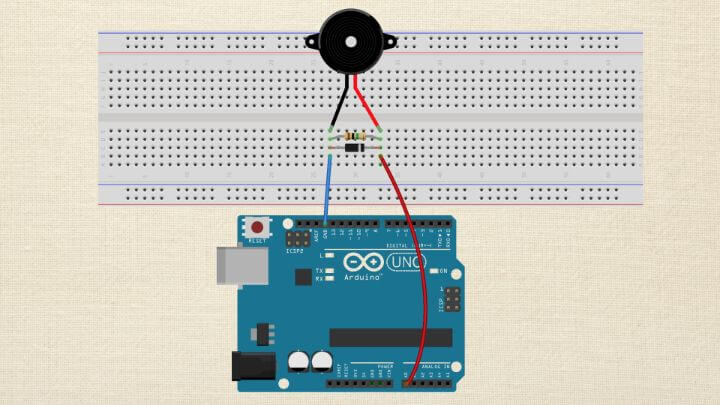
And there you have it, you’re secret knock detector circuit is finished…but how does it work?
An Overview of this Secret Knock Detectors operation
Here is the basic concept of how this will work.
We want something to happen when you tap out a secret code.
We will create a sequence of soft and hard taps – this will be our secret code which will be represented as 0’s and 1’s in an array.
Programming Electronics Academy members, check out the Arrays section of the Arduino Course for Absolute Beginners to master using arrays in your code.
Not a member yet? Sign up here.
For example:
secretKnock[secretKnockLength] = {0, 0, 1, 0};
The code above represents a secret code of soft , soft , hard, soft .
The piezo transducer will turn the mechanical pressure created by the tap into a signal that the Arduino analog pin can read. The level of the signal will determine whether a tap gets characterized as soft or hard.
The threshold of a soft vs hard tap need to be determined empirically, once you have the circuit built – it will depend on what you have the piezo transducer attached to – I have mine taped to a piece of paper.
You should start with the default threshold values provided in the sketch and change them to suit your specific secret knock detector setup.
Once a tap signal is picked up by the Arduino, the sketch will compare the entered sequence of taps to the secret code, one tap at a time.
If the code is entered correctly, then we will trigger an action on the output pin. In this code below, we trigger an LED to turn on for a couple seconds – but you could trigger a servo arm, a pump, or whatever you might need.
If the code is entered incorrectly – nothing happens.
Secret Knock Detector Arduino Code
Here is the code for your hacking enjoyment…
/* Secret Knock Detector Arduino code using a piezo transducer

programmingelectronics.com
This code is in the public domain

*/

const int outputPin = 6;        // led indicator connected to digital pin
const int knockSensor = A0;     // the piezo is connected to an analog pin
const int thresholdHIGH = 150;  // threshold value to decide when the detected knock is hard (HIGH)
const int thresholdLOW = 120;   // threshold value to decide when the detected knock is gentle (LOW)


const int secretKnockLength = 4;  //How many knocks are in your secret knock

/* This is the secret knock sequence
 * 0 represents a LOW or quiet knock
 * 1 represents a HIGH or loud knock
 * The sequence can be as long as you like, but longer codes increase the difficulty of matching */
const int secretKnock[secretKnockLength] = { 0, 0, 1, 0 };

int secretCounter = 0;  //this tracks the correct knocks and allows you to move through the sequence
int sensorReading = 0;  // variable to store the value read from the sensor pin

void setup() {

  //Set the output pin as an OUTPUT
  pinMode(outputPin, OUTPUT);

  //Begin Serial Communication.
  Serial.begin(9600);
}

void loop() {

  // read the piezo sensor and store the value in the variable sensorReading:
  sensorReading = analogRead(knockSensor);

  // First determine is knock if Hard (HIGH) or Gentle (LOW)

  //Hard knock (HIGH) is detected
  if (sensorReading >= thresholdHIGH) {

    //Check to see if a Hard Knock matches the Secret Knock in the correct sequence.
    if (secretKnock[secretCounter] == 1) {

      //The Knock was correct, iterate the counter.
      secretCounter++;
      Serial.println("Correct");

    } else {

      //The Knock was incorrect, reset the counter
      secretCounter = 0;
      Serial.println("Fail - You are a spy!");

    }  //close if

    //Allow some time to pass before sampling again to ensure a clear signal.
    delay(100);

    //Gentle knock (LOW) is detected
  } else if (sensorReading >= thresholdLOW) {

    //Check to see if a Gentle Knock matches the Secret Knock in the correct sequence.
    if (secretKnock[secretCounter] == 0) {

      //The Knock was correct, iterate the counter.
      secretCounter++;
      Serial.println("Correct");

    } else {

      //The Knock was incorrect, reset the counter.
      secretCounter = 0;
      Serial.println("Fail - You are a spy!");

    }  //close if

    //Allow some time to pass before sampling again to ensure a clear signal.
    delay(100);

  }  //close if else

  //Check for successful entry of the code, by seeing if the entire array has been walked through.
  if (secretCounter == (secretKnockLength)) {

    Serial.println("Welcome in fellow Illuminante!");

    //if the sececret knock is correct, illuminate the LED for a couple seconds
    digitalWrite(outputPin, HIGH);
    delay(2000);
    digitalWrite(outputPin, LOW);

    //Reset the secret counter to 0.
    secretCounter = 0;

  }  //close success check

}  //close loop









hello,
Thank you so much for this information.
Altough i have a question according to using this code, and changing it into a code which can detect the length of light signals like long/short (instead of a hard/soft knock)
Do you know if there is a possibility to change this?
Thank you in advance
Hi Elsa, great question.
You might change it so that while your input signal is HIGH, (or if it is above a specific threshold for an analog input), than a counter variable is incremented. Like a while loop thats says … while signal HIGH increment a varible.
Than you use that increment variable as a measure of the relative length of the signals.
Just a thought – many ways to approach this, best of luck!
Very cool project! The feedback given for every knock makes it easy to guess the sequence, so if anyone are planning to use this for the entrance to their secret HQ you might want to leave that part out.
Here’s how to guess the sequence:
*hard knock*
“Fail – You are a spy!”
*soft knock*
“”
…and so on.
Agreed, this would be a bad idea for protecting any evil lairs 🙂
The article was really great! I both understood the concept and the project. Thank you Programming Electronics! *Brofist*
exit status 1
scalar object ‘secretKnock’ requires one element in initializer
what does it means? its an error. i just copy paste
thanks
Hi Matias – there was an issue with the page not showing the square brackets [ ] . I fixed it here, should work fine now if you copy the code and try again.
Hye, where should i put the LED to show that the knock is correct ? Im a newbie btw 🙂 thank you
Great question – I see that was not shown in the circuit diagram! Sorry about that.
For the LED circuit – connect a 220ohm resistor to pin six, the other end to the resistor to the long leg (anode) of the LED and the short leg of the LED to any one of the GNDs (grounds) on the Arduino.
Hope that helps!
Thank you !
Hye, why does my LED blink but not according to the password set in the coding
Great project. Question for u…how to modify the code to add some audio tone for successful knock and other tone for fail knock ? is it possible to get this extra feature using the same piezo ?
Yes, I think you could do that.
In the success if statement, you could add the tone generation. For the piezo buzzer, you would have to make sure to change the pinMode to an output (and then back again, to an input once done). You could use the tone() function to make the audio signal. For the fail mode, you would might be able to use an else condition statement to catch the failure, and play the tone.
exit status 1
scalar object ‘secretKnock’ requires one element in initializer
what does it means? its an error. i just copy paste
thanks
Is some of this code missing?
I don’t think so Randy, was the code giving you a specific issue by chance?
Hi there!
Thank you for the tips. I need some help.
How could I program the sensor to trigger a servo lock to open a box?
Thanks in advance.
HI, How would you set this up to power a dc motor for a specific run time? I have the setup working a servo right now, but want to turn a motor on.