
Arduino UNO R4 WiFi evaluation
I got an Arduino UNO R4 WiFi board a couple of weeks ago and decided to do some experiments with it. This isn’t an extensive test (yet), I just concentrated on the following items for now:
For these tests I used the Arduino IDE 2.1.1 on a Windows 10 OS system. I did notice a few quirks which are specific to the UNO R4 WiFi, but won’t go into those details now.
If you want a walkthrough of the board’s features, this board Arduino R4 overview should be helpful.
UNO R4 Current Measurements
When I first heard of this board and realized that there are two microcontrollers on it (ESP32 and Renesas), I was very curious about the power consumption: i.e. how much current is being drawn from the power supply.
Seeing that the WIFI functionality is done using the on-board ESP32, I wanted to know how much of the current draw is attributed to it (as we all know that ESP32-based boards with WIFI are quite power hungry).
So, I powered all of the test boards using the USB, where I cut the cable’s +5V power rail line and inserted an ammeter in series to measure the actual current being drawn by the board.
For comparison sake, in addition to the R4 WiFi, I also measured the current draw in some other popular Arduino boards and here are the results (units in mA) :
| Test Sketches | Due | UNO R3 | Nano | UNO R4 | Mega |
|---|---|---|---|---|---|
| Idle | 105 mA | 42 mA | 29 mA | 97 mA | 83 mA |
| Blink sketch | 119 mA | 42 mA | 32 mA | 101 mA | 88 mA |
| All Matrix LEDs ON | - | - | - | 101 mA | - |
| Using WIFI | - | - | - | 110-175 mA | - |
So most definitely, the UNO R4 WiFi is consuming more than 2x the power of the UNO R3, just because of the presence of that ESP32!
This will not make this board very user-friendly to battery-powered projects, unless it’s figured out how to disable the ESP32 (if that’s at all possible) when WIFI is never needed.
I also wanted to test the Bluetooth communication, but couldn’t get it to work, as currently there’s no documentation on this 😒.
LED Matrix on the UNO R4 WiFi
This is a unique new feature added to an Arduino board. It has 94 LEDs forming an 8×12 matrix, where each of the LEDs can be individually controlled.
Here’s a quick vid of the set-up that also shows the current measurement config (mentioned in 1 above).
The LEDs don’t look very good in the video, due to the fact that the phone’s and LED’s refresh rates are out of whack, which causes visual flashing. But actually, the LEDs look really good in real-life 🙂
Math operations performance
The UNO R4 boasts a 32-bit architecture, higher CPU frequency, more RAM+Flash memory and a dedicated floating point processor, so I was most intrigued to see if those items would significantly contribute to improved math operations performance.
I am very impressed with the results (!) so take a look :
| Data Type | Math Operation | UNO R3 (uSec) | UNO R4 (uSec) | R4 faster than R3 by a factor of |
|---|---|---|---|---|
| byte | ADD | 0.43 | 0.104 | 4.15 |
| MUL | 0.668 | 0.104 | 6.41 | |
| DIV | 5.447 | 0.152 | 35.88 | |
| SIN | 119.712 | 60.764 | 1.97 | |
| POW | 230.694 | 203.82 | 1.13 | |
| SQRT | 38.15 | 23.712 | 1.61 | |
| int | ADD | 0.87 | 0.104 | 8.35 |
| MUL | 1.423 | 0.105 | 13.61 | |
| DIV | 14.354 | 0.173 | 82.93 | |
| SIN | 120.781 | 60.884 | 1.98 | |
| POW | 232.236 | 203.75 | 1.14 | |
| SQRT | 39.218 | 23.609 | 1.66 | |
| long | ADD | 1.751 | 0.104 | 16.8 |
| MUL | 6.138 | 0.105 | 58.74 | |
| DIV | 38.834 | 0.173 | 224.34 | |
| SIN | 121.033 | 60.884 | 1.99 | |
| POW | 232.616 | 203.75 | 1.14 | |
| SQRT | 39.47 | 23.61 | 1.67 | |
| long long | ADD | 6.091 | 0.229 | 26.59 |
| MUL | 24.688 | 0.292 | 84.49 | |
| DIV | 29.272 | 2.617 | 11.18 | |
| SIN | 136.564 | 67.347 | 2.03 | |
| POW | 257.129 | 211.578 | 1.22 | |
| SQRT | 59.56 | 30.121 | 1.98 | |
| float | ADD | 7.864 | 0.105 | 75.25 |
| MUL | 9.765 | 0.105 | 93.18 | |
| DIV | 30.775 | 0.376 | 81.76 | |
| SIN | 115.304 | 5.065 | 22.77 | |
| POW | 222.033 | 41.591 | 5.34 | |
| SQRT | 31.07 | 1.025 | 30.3 |
OpAmp
One of the new features supported by the UNO R4 WiFi is an analog part, which is an OpAmp (Operational Amplifier).
For those not acquainted with this electronic component, it can be usually used as a voltage comparator, a voltage follower (i.e. a buffer) and as a voltage amplifier. I really found it to be cool that the designers threw in such a part (i.e. analog) into this mostly digital component.
Don’t want to go into the details, but I tested it in simple comparator/follower/amplifier use-cases and it worked very well! One good thing is that its output swings from rail-to-rail (i.e. 0V and 5V) which is not the case in most OpAmps.
The not so good thing is that the output drive capability is not that great: i.e. the output can’t source a high current, which is a bit of a drag.
But overall, I’m happy that this feature is provided, as many times there’s a need to amplify a small analog signal from a sensor, say, before routing it to the Analog-to-Digital Converter (ADC). So this integrated feature can be very handy without requiring other external components.
Digital-to-Analog Converter (DAC)
Another nice feature that has been added to the R4 WiFi is the Digital-to-Analog Converter (DAC).
We all have likely used the PWM on the Arduinos before (i.e. for dimming an LED). This was an indirect way to simulate analog behavior.
But with the DAC, one can physically create a true voltage waveform of any shape. One useful application of this is to generate audio.
The R4 WiFi has support for generating sine, square and sawtooth waveforms and here they are (captured by my el-cheapo portable oscilloscope) :
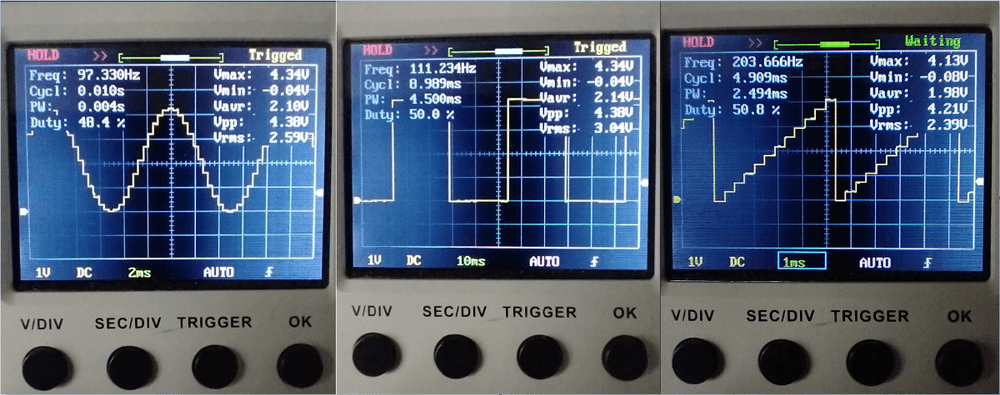
Note how bad are the jaggies in the sine and sawtooth captures; this indicates that the DAC is set to a low resolution causing high granularity in the output’s waveforms.
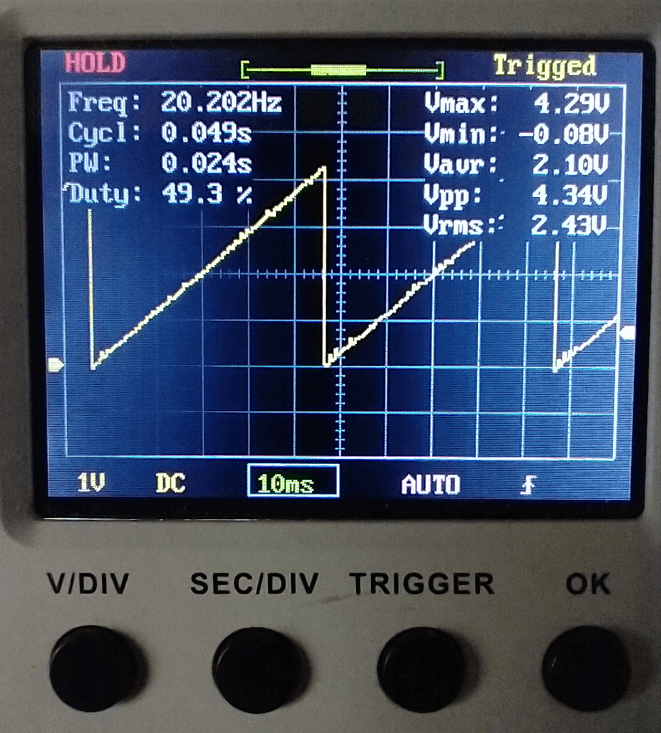
I then decided to write a little code myself to use a high resolution, so here’s the sawtooth waveform using a 12-bit DAC (looks so much nicer!) :
UNO R4 WIFI Board Summary
The new UNO R4 WiFi board is quite impressive and is loaded with features and sports high-performance computational abilities. Aside from the default high-current consumption, I don’t have any real concerns or complaints and am truly liking this board so far.
I’ll continue to explore its other features (i.e. Bluetooth, debug support, compatibility, etc) and will update this thread with other new–and hopefully interesting–findings. Cheers!









