
Multiple display weather station using OpenWeather :: Member Project
This is an amazing weather station built by one of our members Christopher Cooper – check it out!
How does your project work?
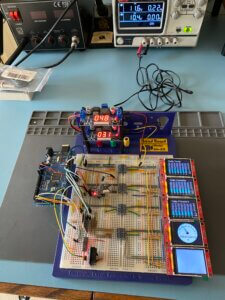
Multiple SPI TFT display weather station, providing an 8 day forecast as well as an 8 hour forecast, using OpenWeather and their OneCall API.
As with my first project of the digital cribbage board, my parents asked for another gadget which they have always wanted, a digital weather station, and to be frank, so have I.
Yes, I could just look at my mobile phone, but where’s the fun in that?
I decided that I would like to see a decent forecast, one which shows multiple days and if possible switch to the next few hours and then discovered OpenWeather.org…
Using their free subscription service, and their OneCall API, I had access to all of the data I needed, but what about a display? There were plenty of single screen weather stations but I had in mind what I wanted to build.
At the start, I needed to learn about multiple displays before I could do anything else, as if I didn’t crack that, then the rest of the project would stall.
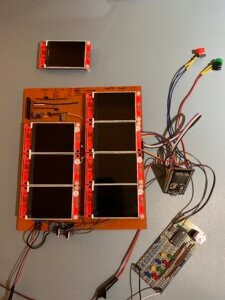
Once I had cracked how to drive multiple displays, I switched to an ESP32 and built a fully working unit on strip board.
This is where I expanded the design, such as learning about extending the I/O outputs, so I could control each TFT backlight, using an I2C I/O expander, the Microchip MCP23008 and a dual MOSFET design.
Along with expanding the available I/Os, I made use of the inbuilt capacitive touch functions of the ESP32 as well as ensuring in future designs I could expand what this display panel could be used for.
For example, the bottom left TFT could be switched to the 2.4” touch version, instead of using the capacitive touch buttons, plus the two upper most displays could have their SD card slots enabled as all of the connections are in place.
Finally I have also included a secondary I2C, the BME280 Barometric Air Pressure Temperature and Humidity Sensor Module. So should you need internal environmental monitoring in your project, the connections are once again all built in.
These features mean that the display panel could be repurposed to a home automation panel, hydroponics control panel or multiple sensor display panel.
What was your biggest struggle as you worked through this project?
There were a few challenges to say the least. Ensuring all 8 TFT displays could work at 40Mhz using strip board wasn’t easy. In fact, at one point I thought I would have to give up and use both SPI bus options on the ESP32, the VSPI as well as the HSPI, but luckily I ironed out all of the issues (well I thought I had).
What was a lot of fun was using the MCP23008 to control a dual MOSFET switch design which I learnt from Ralph S Bacon.
That said, whatever planning you do, there is always a last minute design problem and this project was no exception. Do you remember earlier where I said I thought I had solved the SPI bus problems, well I hadn’t. The bottom left display kept corrupting at 40Mhz and would only stabilize at 20Mhz which for me wasn’t fast enough.
By chance, when scoping out the SPI BUS, I realized the problem disappeared, so after reading up on Oscilloscope probe resistance, I tested a series of low value resistors on the CLK line and the problem was resolved!
Did the project end up as you expected?
Yes, it did but with more usable features for future projects which need multiple displays. I am really chuffed with the look and feel of it and it is really solid.
Looking back on this project, what can you say you have learned about programming and/or electronics through the creation process?
A great deal, as my journey continues thanks to Michael and PEA.
This project was a different microcontroller to my previous projects, more features so more library’s and now getting into WiFI, Web Servers even more than previously including what APIs are all about.

Was the training at Programming Electronics Academy able to help you build your skill?
Yes, take a look at the projects I am building and this is all thanks to two people, a chap I work with called Jason Harris who introduced me to Arduino and then Michael and PEA where I learnt Arduino!
Are there any final notes you would like to say about this project submission that we haven’t covered elsewhere?
Thanks to Ken Venables, Rui Santos and Sara Santos, Kris Kasprzak, and Ralph S Bacon.
To get a video walkthrough of this build, check out the playlist that Christopher put on his YouTube channel.
 Christopher is the director of an IT company in the UK. He has recently picked up his childhood joy of electronics, and has taken on the exciting challenge of learning software development.









